Make no mistake about it; Canva is a great app. It's a highly polished, cloud-based design platform that quickly became a household name, and for good reason. The ease of use is genuinely impressive. You have images, text and fonts, objects, and templates. You can mix and match all of this to your satisfaction, creating images that look professionally designed without any formal design experience.
The big drawback to Canva's model, though, is the cost. It's free to register and free to use, but that's a little misleading. It's free the same way that a mobile game is free; you can use it, but to get the most out of it, you need to pay for the extras.
In the case of Canva, those extras add up fast. Many of the premium templates, images, and brand features are locked behind Canva Pro, which runs around $15 per month. This is fine as a business model, and for heavy users it may well be worth it. But if you're only dipping in occasionally, the costs can feel disproportionate to what you're actually getting.
A lot of times, when you look around for an alternative to something like Canva, you see lists of expensive programs. I doubt anyone using a free design app is going to want to shell out the high monthly costs for the Adobe Creative Suite. Even if you use Canva enough that the costs would be reasonable, Photoshop and Illustrator have such a high learning curve that the time lost more than makes up for the savings.
There are dozens of alternatives out there, but the one I keep coming back to is the Pixlr editor.
Key Takeaways
- Canva's free tier is limited; unlocking full features requires Canva Pro at around $15 per month.
- Pixlr offers over 500,000 free stock assets, 600+ effects, and AI-powered tools across desktop and mobile.
- Pixlr's pricing is more flexible, ranging from free to $12.99 per month for teams of five.
- Pixlr scores slightly lower in user satisfaction than Canva (90% vs 94%) and has fewer community tutorials.
- 95% of Pixlr reviewers cite photo editing as their primary use case, suggesting it suits experienced users more.
All About Pixlr
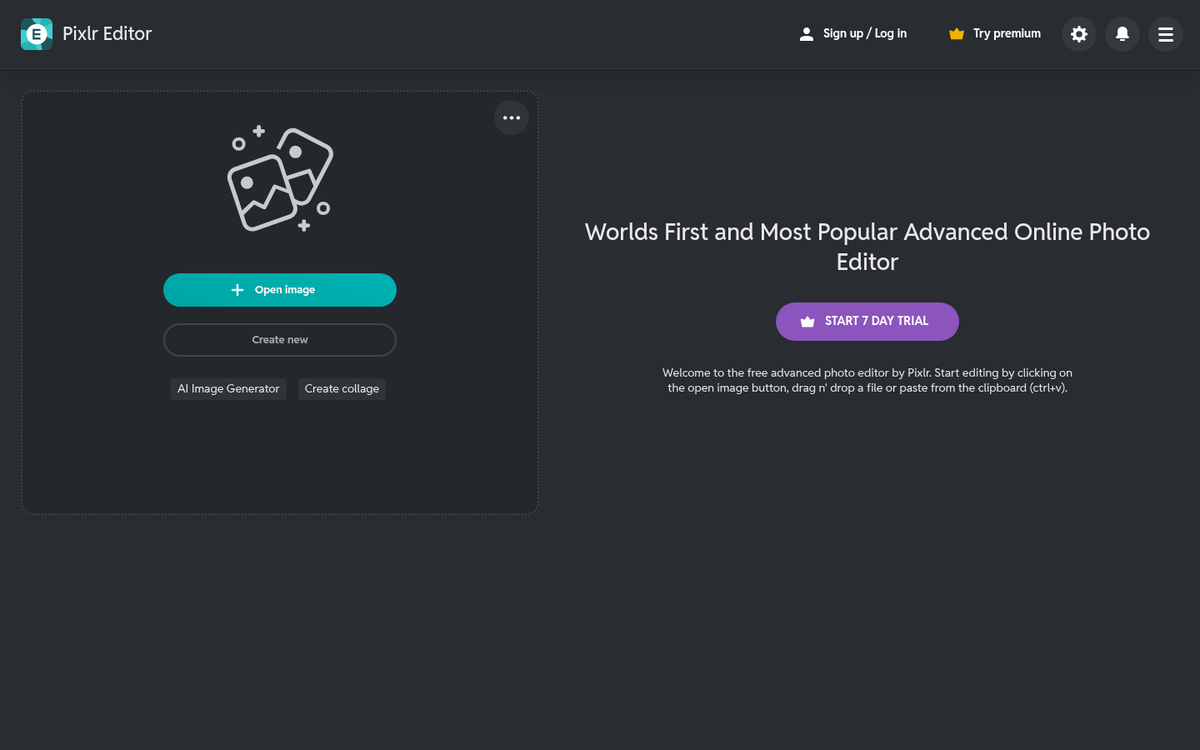
You can find the Pixlr editor over at their website at pixlr.com. When you open it up, you're presented with a clean, modern interface that offers multiple editing modes depending on your skill level and what you're trying to accomplish. You can create a new blank image, upload from your computer, or pull in assets from Pixlr's own library of over 500,000 free stock assets, including images, videos, fonts, and more.
You can also use Pixlr on a mobile device. The app is available on both the Apple App Store and Google Play, so whether you're on a phone or tablet, you're covered.
The desktop experience has evolved significantly over the years. Pixlr now offers AI-powered tools that put it in a different league compared to where it started. It's still approachable for beginners, but it also has enough depth to satisfy more experienced users who want more control than Canva typically offers.
Both the mobile and desktop versions have a lot of guided functions. You can refine images, add effects, apply overlays, work with text, add stickers and borders, and much more. Pixlr now advertises over 600 effects and overlays, and when you start combining those with its other features, the creative possibilities are genuinely substantial.
Now, Pixlr isn't entirely free. Yes, I know, I just talked about how the primary downside to Canva is the price, and here I am telling you about another app with paid tiers. Bear with me.
There are several pricing options, and each of them has different features and price points.
The free plan exists and gives you access to core editing tools, along with 20 free AI credits to try out the newer generative features. It's a genuinely useful starting point and more than enough for casual or occasional use.
If you want more, Pixlr offers a Plus plan at $1.99 per month, which is about as low a barrier to entry as you'll find anywhere. The Premium plan runs $7.99 per month and unlocks the full suite of tools, unlimited AI credits, and priority access to new features. There's also a Team plan at $12.99 per month for up to five users, which makes it a surprisingly affordable option for small teams or agencies. All paid plans come with a 7-day free trial, so you can kick the tires before committing.
Compared to Canva Pro at around $15 per month, Pixlr's pricing structure is noticeably more flexible, especially if you don't need everything at the top tier.
Not All is Perfect in Paradise
A low cost, a massive asset library, AI-powered tools, and options for users at every skill level; what's not to love about Pixlr? Well, unfortunately, there are a few drawbacks.
The primary one worth mentioning is that Pixlr scores slightly lower than Canva in overall user satisfaction. On Crozdesk, Pixlr scores 90% compared to Canva's 94%. It's not a dramatic gap, but it does reflect the reality that Canva has a more polished, consistent user experience, particularly for total beginners.
The other drawback is in tutorials and community support. Pixlr's user base, while solid, is smaller than Canva's, and that means fewer third-party tutorials, templates shared by other users, and community resources to lean on when you get stuck. According to GetApp, the majority of Pixlr's reviewers come from marketing, IT, and design backgrounds, with 95% citing photo editing as their primary use case. That tells you something useful: Pixlr skews toward users who already have some familiarity with image editing. If you're a complete newcomer, Canva may feel more immediately intuitive. But if you want more power and flexibility without paying Canva's premium, Pixlr is absolutely worth a serious look.