





Bounce rate is a term often thrown around as meaningful in SEO discussion, and it really is quite meaningful, but too many people don't seem to know why. In an effort to address that issue, here's some information about bounce rate and why it's important.
First of all, you need to understand exactly what your bounce rate is. A simple definition is easy; your bounce rate is the number of people who visit your site and immediately leave without clicking through to another page.
At first glance, this sounds like a bad thing. People see your page and leave. They aren't sticking around to explore any of the useful content you've posted over the past months. They aren't clicking your ads or your navigation to go buy your product. Or are they?
The key to understanding your bounce rate is understanding that it's not always a bad thing. There are a number of reasons why a user might leave immediately in a positive light:
- They were looking for a specific piece of information, which you provided.
- You were trying to funnel traffic to your Facebook page, and they clicked through to it.
- You were trying to get users to call or email your contact information, which they did.
- You were asking for newsletter signups that dynamically generate a confirmation via script rather than redirect to a confirmation page.
It all comes down to your goals. If a successful conversion, as determined by what you want to get out of a visitor on your site, involves something that doesn't require loading a second page, your bounce rate may be higher than normal just because it doesn't differentiate. This is one reason it's possibly a good idea to funnel users to a second page to convert, no matter what page they start on; your bounce rate will be a more accurate measurement of dissatisfied users.
Before digging in, it helps to have a sense of what "normal" actually looks like. According to Databox data from September 2024, the median bounce rate across all industries sits at 44.04%. That said, it varies significantly by niche - Siege Media's analysis of over 84 million blog sessions found an average blog bounce rate of 82.4%, while real estate sites averaged as low as 40.78% and travel sites as high as 82.58%. So before you panic about your numbers, make sure you're comparing apples to apples.
So, what can you learn from your bounce rate?
Key Takeaways
- Bounce rate isn't always negative; users may leave after successfully completing a goal like calling, emailing, or finding information.
- Industry benchmarks vary widely - blogs average 82.4% while real estate sites average 40.78%, so always compare within your niche.
- Analyzing bounce rate by individual page reveals which content satisfies users and which needs improvement or stronger calls to action.
- Traffic sources with high bounce rates may not justify paid investment, since those visitors aren't engaging meaningfully with your site.
- Cross-referencing Google Analytics and Search Console helps identify whether high bounce rates signal a mismatch with user search intent.
1. How Your Content Performs
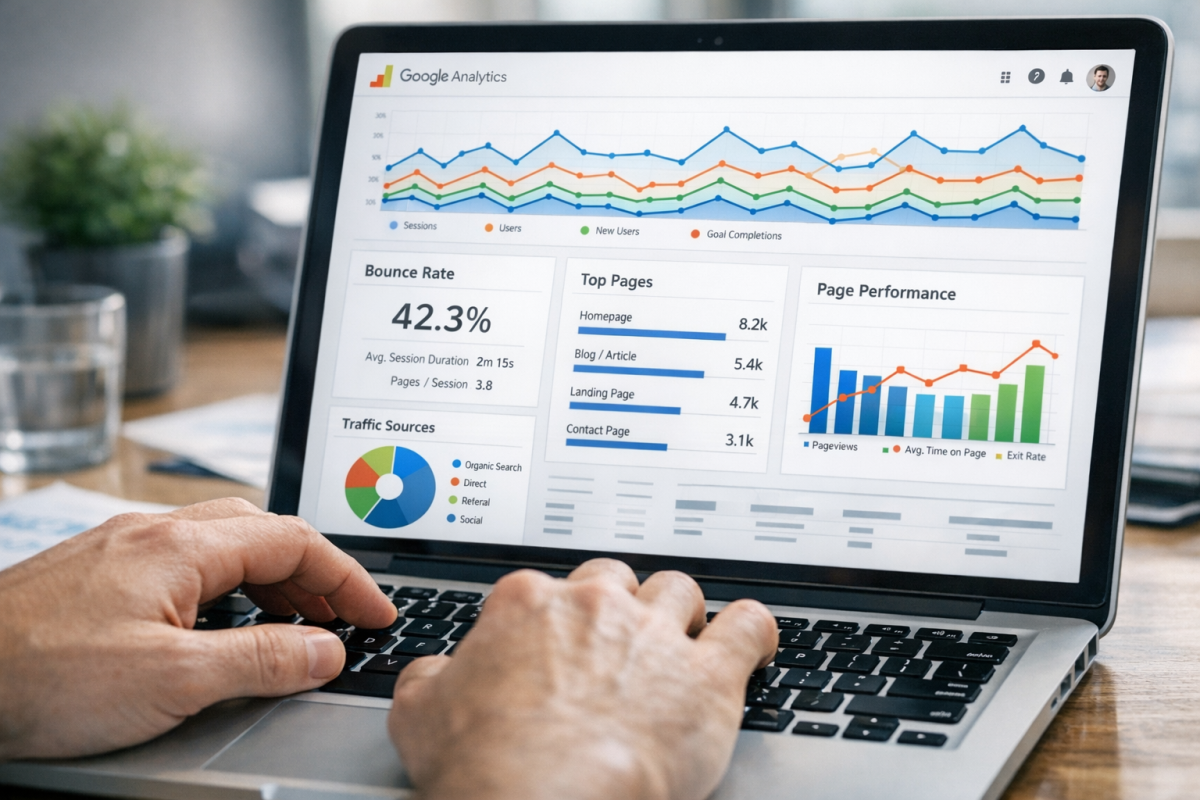
Log in to Google Analytics and navigate to your content or pages report. You're going to want to dig into it until you reach the view that shows your individual pages, their pageviews, the time spent on page, and the bounce rate for each page. You can sort this in a few ways to make it interesting.
- What is the bounce rate of your most popular page? If it's high - like 80%+ high - you can probably assume that it's doing its job. That is, users search for that content, read it, and are satisfied so they leave. You can treat this as an opportunity to add a compelling call to action to the page, to try to funnel some of those users to other interesting pages. A related articles widget might be a good idea, or more internal links when relevant in the content.
- What is the bounce rate of your worst pages? If the bounce rate is high, it's an indicator that those pages aren't performing well. You may need to spice up the content. You may need to add a prominent link to other parts of your site that users find more interesting. You might not need to do anything at all; after all, some pages don't need to be that compelling.
- Which pages have the lowest bounce rate? These pages are highly effective at funneling users into other parts of your site. Study what they're doing and use that as a model to improve other pages on your site.
In general, the pages you want to improve the most are the pages with high volumes of pageviews and a high bounce rate. Any page with a high bounce rate is a good target to optimize; even if a user leaves satisfied, you'd prefer they don't leave at all. There are many ways to reduce the bounce rate on your blog worth exploring if you're struggling with this.
One thing worth mentioning here: page load speed has a direct and measurable impact on bounce rate. According to Google, the probability of a bounce jumps 32% when a page goes from one second to three seconds to load. If your content is solid but your bounce rate is still stubbornly high, your site speed may be the culprit worth investigating first. You might also consider installing an exit popup to recapture visitors before they leave.
2. How Your Traffic Performs

In Google Analytics, navigate to your traffic acquisition report. This will show you the source of your traffic, the number of sessions from each source, pages per session, average engagement time, the percentage of new users, and the bounce rate.
From this report, you're going to learn how your traffic sources stack up. Obviously, you'll be able to see which traffic sources bring in the highest volumes in a given time. However, that's not always a useful metric. For example, if you had a blog post go viral, you'll see a huge influx of traffic for that post, but the traffic will often come from less relevant sources and those users will tend to bounce quickly.
- What are the traffic sources with the lowest bounce rate? These traffic sources bring in an audience that is already very interested in what you have to say, and those users tend to click around your site quite a bit. You want to see what the source is using as link anchors, assuming it's not organic search traffic. You also want to see what pages those sources are linking to, to use as a model for optimizing calls to action elsewhere.
- What are the traffic sources with the highest bounce rate? If you have a lot of traffic coming from a particular source but that traffic doesn't engage much, you may want to evaluate whether that source factors into your paid strategy. You don't necessarily want to pay to pull in users who aren't sticking around.
3. How Your Keywords Perform

To get keyword-level bounce data, you'll want to cross-reference Google Analytics with Google Search Console. Within Analytics, dig into your organic traffic and look at landing page performance. Within Search Console, you can see which queries are driving clicks to which pages. Combining these two data sets gives you a much clearer picture than either tool offers alone.
- First, take a look at any pages that show up with a wide range of different queries. Check which keywords correlate with higher or lower engagement. High bounce rates paired with low time-on-page suggest the content isn't meeting user intent - and you can either revise the content or reconsider whether you want to target those terms at all. Alternatively, you can add a section to better serve those users.
- Which pages have the most visits with the lowest bounce rates? These pages are good examples of how to get users to click through to other parts of your site. A low bounce rate is generally a good sign. However, check to see if the engagement time is also low; a page with a low bounce rate and minimal time on page may be acting as a gateway page and could be getting in the way of the content you actually want to serve.
You can work to improve your bounce rate across the board, but to do so, you need to know how to monitor it. Always pay attention to pages with low bounce rates - they're doing something right, and you may want to use them as examples for future content. And always benchmark against your own industry; an 82% bounce rate might be completely normal for a blog in your niche, while a 55% bounce rate might be a red flag for an e-commerce product page.


1 response
Thoughtful replies only - we moderate for spam, AI slop, and off-topic rants.
Superb & This is needed for every one - thanks for sharing