




Structured data has quietly become one of the more important technical tools available to website owners and managers - it's not new, but its relevance has grown considerably as places like Google, Bing, and AI-driven answer engines depend more heavily on machine-readable signals to understand and present web content. As search continues to shift toward AI-generated answers and zero-click results, that gap matters more than ever.
This glossary entry breaks down what structured data is, how it works behind the scenes, and - most importantly - why it belongs in your strategy if you care about AI Optimization (AIO) and Answer Engine Optimization (AEO). No deep technical background required. Whether you're managing a small business site or overseeing a large content operation, this is a concept worth understanding before your next conversation with a developer or SEO strategist.
Quick Answer
Structured data is information organized in a predefined format, typically stored in rows and columns like a database or spreadsheet. It is easily searchable and machine-readable, making it simple to input, query, and analyze. Common examples include SQL databases, Excel files, and CSV files. Unlike unstructured data (such as text or images), structured data follows a consistent model, allowing for efficient storage and retrieval. It is widely used in business applications, financial records, and data analytics.
What Structured Data Actually Means
Structured data is information that has been organised into a defined format so machines can read it. Think rows and columns in a spreadsheet - every part of data sits in a predictable place, with a label and nothing is left to interpretation.
Not all data works that way. Semi-structured data has some organisation to it but doesn't follow a strict format. An email is an example - it has headers, a sender and a subject line. But the body can have almost anything. Unstructured data has no fixed format at all, like a handwritten note or a photo. A machine can store these things but it can't extract meaning from them without extra processing.
The table below shows how these three types compare at a glance.
| Type | Format | Machine Readability | Example |
|---|---|---|---|
| Structured | Rigid, predefined schema | High | Database table, spreadsheet |
| Semi-structured | Partial organisation | Medium | Email, JSON file, XML |
| Unstructured | No fixed format | Low | Handwritten note, image, video |
Structured data makes up only about 20% of the data generated globally. The majority of information out there - social media posts, videos, audio recordings, documents - falls into the other two categories.
That 20% figure puts into perspective how much effort goes into making data machine-readable and how helpful it can become once it is. Structured data is the foundation of databases, analytics tools and software systems that businesses use every day.
In the web and SEO world, the term "structured data" takes on a more specific meaning - it refers to a particular way to mark up content on a webpage so search engines can understand it. That's what the next section covers, and it connects closely to how zero-click search results are generated.
How Structured Data Works on a Website
On a website, structured data is added directly to a page's code using a shared vocabulary called Schema.org - this vocabulary gives developers and content creators a common set of labels - things like "Product", "Review", or "Event" - to describe what's on a page in a way machines can read reliably.
That vocabulary gets applied through one of three formats, and each one works differently, and the format you use changes how the code sits within your page.
JSON-LD places the structured data in a separate script block in the page's HTML - it doesn't touch the visible content at all, which makes it much easier to add and update. RDFa and Microdata wrap the HTML elements on the page with extra attributes to tag content in place - it means changes to your layout can affect your structured data too.
JSON-LD has become the dominant choice by a wide margin. According to the 2024 HTTP Archive Web Almanac, it now accounts for 41% of structured data usage across the web, up 7% year over year. That growth makes sense - it's the easiest format to work with and the least disruptive to implement.

Google also recommends JSON-LD specifically, which has pushed adoption further. When a big search engine has a preference, developers follow it. If you're managing a WordPress site, tools like Yoast SEO can simplify how you handle structured markup alongside other technical SEO tasks.
Here's a quick overview of how each format behaves in practice.
| Format | Where the code lives | Ease of use |
|---|---|---|
| JSON-LD | A separate script tag in the HTML head or body | Easiest to add and update |
| RDFa | Embedded within existing HTML elements | More complex, tied to page structure |
| Microdata | Embedded within existing HTML elements | Similar to RDFa, largely outdated |
All three formats can describe the same information - the difference is in how that information gets placed into the page and how easy it is to work with over time.
What Search Engines and AI Systems Do With It
Search engines and AI systems process structured data in ways that have real consequences for how your content gets found and used.
One of the biggest things this enables is entity recognition. An entity is a defined thing - a person, a business, a product, an event. When your markup identifies a thing with a name, type and set of properties, Google can link it to what it already knows about that thing in its Knowledge Graph. The Knowledge Graph is basically Google's internal map of real-world entities and how they connect to each other. Getting your content tagged with the right entity helps Google place you accurately within that map.

This is where structured data starts to matter for more than traditional search results. AI-powered features like Google's AI Overviews pull from sources they can interpret with confidence. When a system is trying to generate a direct answer to a question, it gravitates toward content where the facts are machine-readable and unambiguous. Structured data gives your content that quality - it removes the guessing.
Answer engines and AI assistants work the same way. They need to extract facts faster - things like opening hours, prices, author names, or instructions. If those facts are buried in plain paragraphs, the system has to infer them. If they're in structured markup, the system can pull them. That makes your content a more reliable source to cite or summarise.
That is the core of what we mean by Answer Engine Optimisation, or AEO - making your content legible to machines that choose what to surface and what to skip - not about gaming a system. Structured data is one of the most direct ways to do that, because it translates your content into a language these systems already speak.
The Types of Schema Markup Most Relevant to Website Owners
There are hundreds of schema types listed on Schema.org. But most website owners only need to remember a handful. The ones below cover most real-world use cases and unlock the most visible search features.
FAQ schema lets you mark up question-and-answer content so Google can display those Q&As directly in search results. Article schema tells search engines that a page is editorial content, and it helps with indexing and gives you rich result eligibility. Product schema is what matters for any page that sells something - it surfaces price, availability, and ratings right in the results. LocalBusiness schema is worth adding if you have a physical location, because it feeds into map results and local knowledge panels.

Review and AggregateRating schema go hand in hand with Product pages. But they also work on their own for things like service pages or media content. HowTo schema is a strong one to use if your page walks through a series of steps, as it can generate a visual display in search. BreadcrumbList schema helps search engines understand where a page sits within your site structure and shows a cleaner URL path in results - similar to how Google Sitelinks work on your blog.
The table below breaks this down at a glance.
| Schema Type | Best Used For | Search Feature It Can Unlock |
|---|---|---|
| FAQ | Pages with question-and-answer sections | Expandable Q&As in search results |
| Article | Blog posts, news, editorial content | Rich result eligibility, Top Stories |
| Product | E-commerce and product pages | Price, availability, and ratings in results |
| LocalBusiness | Businesses with a physical address | Local pack and knowledge panel data |
| Review / AggregateRating | Product, service, or media pages | Star ratings in search snippets |
| HowTo | Step-by-step instructional pages | Visual step display in search results |
| BreadcrumbList | Any multi-level site structure | Breadcrumb path shown in search snippet |
Think about which of these match the pages you already have - it's the right place to start.
Why Structured Data Lifts Click-Through Rates
Structured data offers a clear advantage in search results, and there's data to back that up.
Research from Google shows that structured results earn a click-through rate of around 58%, compared to 41% for standard results without any rich features; it's not a small gap, and it reflects how much more attention an improved result can pull compared to a plain blue link.
The reason makes sense when you see what a search results page looks like. A result with star ratings, a price, a review count, or an FAQ section takes up more visual space and gives more to act on. Someone looking for a recipe or a local business gets helpful information before they can even click. That extra detail builds enough trust to make the click feel worthwhile.
Real-world examples make this even more concrete. Rotten Tomatoes added structured data across their pages and saw a 25% increase in click-through rates for those results. Food Network implemented recipe markup and tracked a 35% increase in visits from search. These are results from a technical change that doesn't touch the content itself.
It's worth being clear here: results like those don't happen for every site, and implementation quality matters quite a bit. A site with thin content or poor markup won't see the same lift. But the underlying reason structured data works is consistent across cases - search engines can read your content more precisely, and users see a better, more informative result.
Star ratings draw the eye. FAQ dropdowns can answer the searcher's question right on the page, which sounds counterintuitive but actually builds credibility and increases the chance of clicks to learn more. Product markup that surfaces pricing and availability gives shoppers what they want faster than any competitor without it.
The click-through rate improvement is the most direct way to measure the results of structured data. But it flows from something more basic: your search results become more useful, and helpful results get more attention.
Common Mistakes That Break or Waste Your Markup
Even with the best intentions, structured data can fail quietly. Google won't always tell you something is wrong - it just won't reward you with rich results.
One of the most common mistakes is marking up content that doesn't actually appear on the page. If you add schema for a review rating but visitors can't see that rating anywhere in the page content, Google treats it as deceptive. The markup gets ignored or, in worse cases, flagged as a violation. Whatever you mark up needs to match what users can read on the page.
Choosing the wrong schema type is another easy mistake to make. Using Product schema on a blog post or Article schema on a product page sends mixed signals. Google has to be able to match your schema type to the content, so it's worth checking schema.org for the right fit before you publish.
Incomplete markup is also a problem. Schema types have required and recommended properties, and leaving too many of them blank limits what Google can do with your data. A Recipe schema without cook time, ingredients, or an image is missing most of what makes a great result possible.
The table below covers the most common mistakes and what to do instead.
| Mistake | Why It Matters | What to Do |
|---|---|---|
| Marking up hidden content | Google treats it as misleading | Only mark up content visible to users |
| Wrong schema type | Creates a mismatch Google can't use | Check schema.org for the correct type |
| Missing required properties | Reduces or removes rich result eligibility | Fill in all required and recommended fields |
| Never testing the markup | Errors go undetected | Run pages through Google's Rich Results Test |
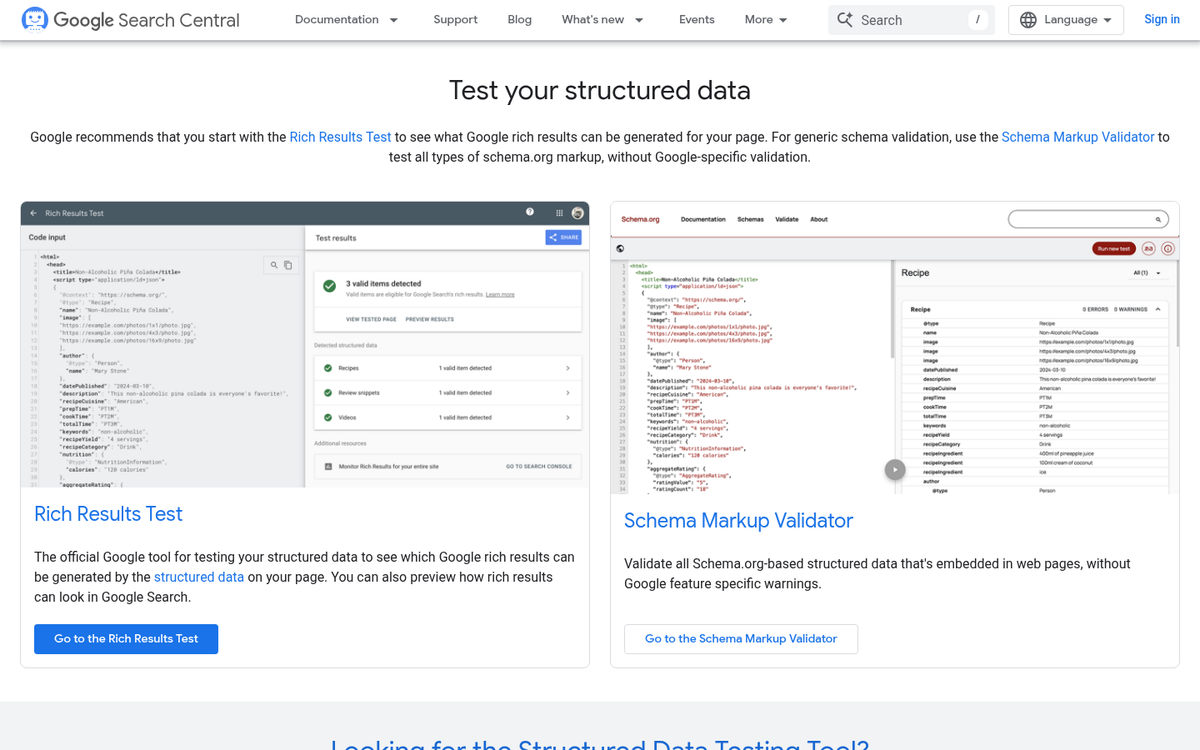
Testing is the step that most people skip. Google's Rich Results Test is free and takes about thirty seconds to run - it will show you what Google can read and flags anything broken. Given that poor implementation is widespread even among sites with dedicated data budgets, testing is how you stay ahead of the problem.
How to Add Structured Data Without Being a Developer
You don't need to write code from scratch to get structured data onto your site. There are a few different paths depending on how your website is built and how comfortable you are with the technical side of things.
If your site runs on WordPress, a plugin is the most easy path. Tools like Yoast SEO, Rank Math and Schema Pro let you add and manage markup through a dashboard interface. You fill in the fields and the plugin works with the code silently.
Google Tag Manager is another option worth learning about - it lets you paste JSON-LD markup directly into a tag and fire it on whichever pages you choose. This works if you want more control without editing page templates, and keeps everything in one location for easier updates later.
For those happy to copy and paste a bit of code, manual JSON-LD implementation is actually quite accessible. JSON-LD goes inside a script tag in the head section of your page and there's no need to touch the rest of the HTML. Most schema types follow a predictable structure, so once you've done one, the rest get easier.

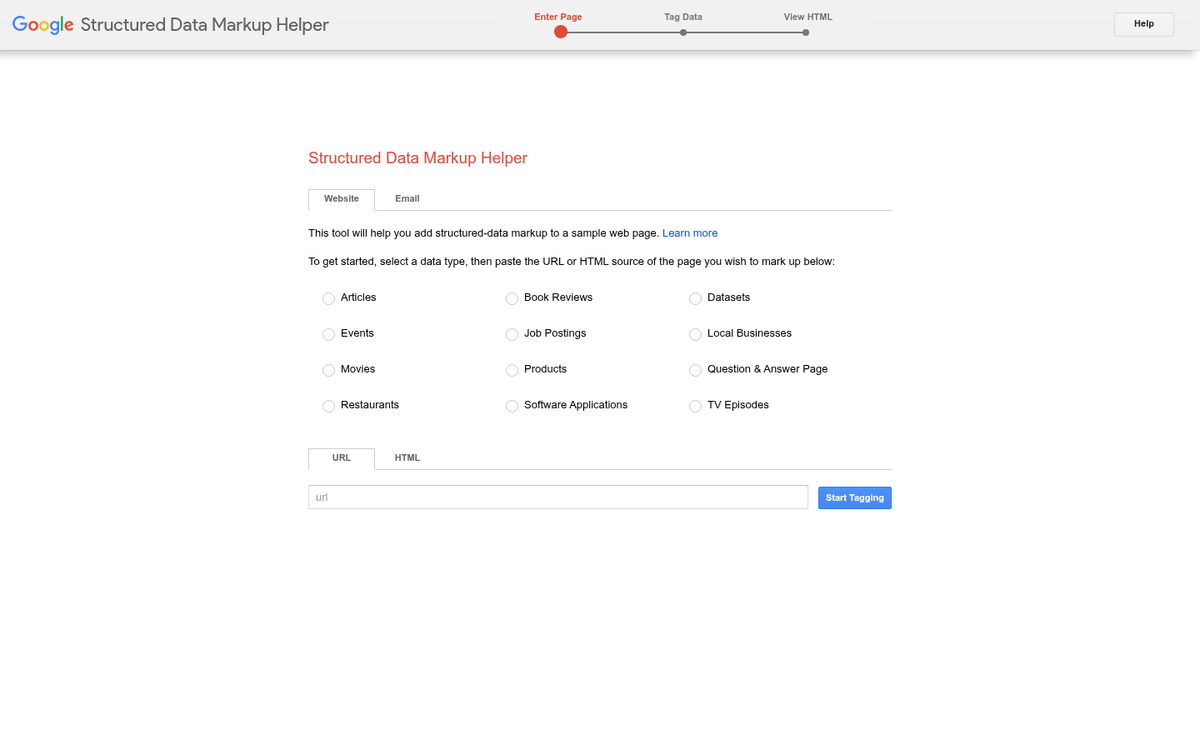
The basic process works like this regardless of which path you take. First, choose the schema type that fits your content - Article, Product, FAQ, Local Business and so on. Then build your markup using a generator like Google's own Structured Data Markup Helper or a third-party tool like Schema.dev. Then validate it before you publish anything.
Validation is a step that saves problems. Google's Rich Results Test will tell you if your markup is eligible to generate rich results, while the Schema Markup Validator checks for structural errors. Use both, because they each flag different things.
Once validated, deploy the markup and give it a few days. You can then return to Google Search Console to see if any new rich result types have been detected under the Enhancements section. That feedback loop tells you if the markup was read correctly and if anything needs attention. If you're managing multiple aspects of your WordPress site at once, reviewing the best WordPress SEO plugins can help you find tools that handle structured data alongside other optimizations.
Your Structured Data Cheat Sheet to Getting Found by AI
Here is an easy checklist to move from reading to doing:
- Audit your existing pages for missing or broken schema using Google's Rich Results Test
- Prioritize schema types that match your content - FAQ, Article, Product, LocalBusiness, or HowTo
- Use JSON-LD format and place it cleanly in the page head or body without clutter
- Validate every implementation before and after publishing
- Review your markup regularly as your content updates, so your structured data never falls out of sync
Structured data is not a project reserved for businesses with in-house developers - it's a basic content layer that any website owner can apply, and the sites doing it are already pulling ahead in AI-powered search results. Structured data works - the question is whether your content has it.
FAQs
What is structured data in simple terms?
Structured data is information organised into a defined, machine-readable format using labels and a fixed schema. On websites, it refers to markup added to page code using Schema.org vocabulary, helping search engines and AI systems understand your content accurately.
Why does structured data matter for AI search?
AI-powered search features like Google's AI Overviews prefer content where facts are machine-readable. Structured data removes ambiguity, making your content a more reliable source for AI systems to cite or summarise in generated answers.
Which structured data format should I use?
JSON-LD is the recommended format. It sits in a separate script block without touching visible content, making it easier to add and update. Google explicitly recommends it, and it accounts for 41% of structured data usage across the web.
Can I add structured data without coding skills?
Yes. WordPress plugins like Yoast SEO and Rank Math handle markup through a dashboard. Google Tag Manager and structured data generators like Google's Markup Helper also let you implement schema without writing code from scratch.
Does structured data improve click-through rates?
Yes. Research shows structured results earn around 58% click-through rates versus 41% for standard results. Rich features like star ratings, prices, and FAQ dropdowns make search results more informative and visually prominent, driving more clicks.