




If you've spent any time searching on Google, you've almost certainly seen this box. It blends so seamlessly into the results page that you scroll past it without a second thought.
In the context of Answer Engine Optimization (AEO), People Also Ask holds particular weight. As search engines evolve into answer engines - systems designed to give you direct replies instead of just links - PAA boxes represent the featured, authoritative answer placements that AEO strategies are built around. Winning a PAA placement means Google has identified your content as a honest, well-structured answer to a user question; it's a signal worth pursuing deliberately.
The sections below break that down in helpful terms.
Quick Answer
I don't see any article text included in your message. Could you please share the article content you'd like me to summarize? I'll be happy to provide a concise answer once I can see the material.
How the People Also Ask Box Actually Works
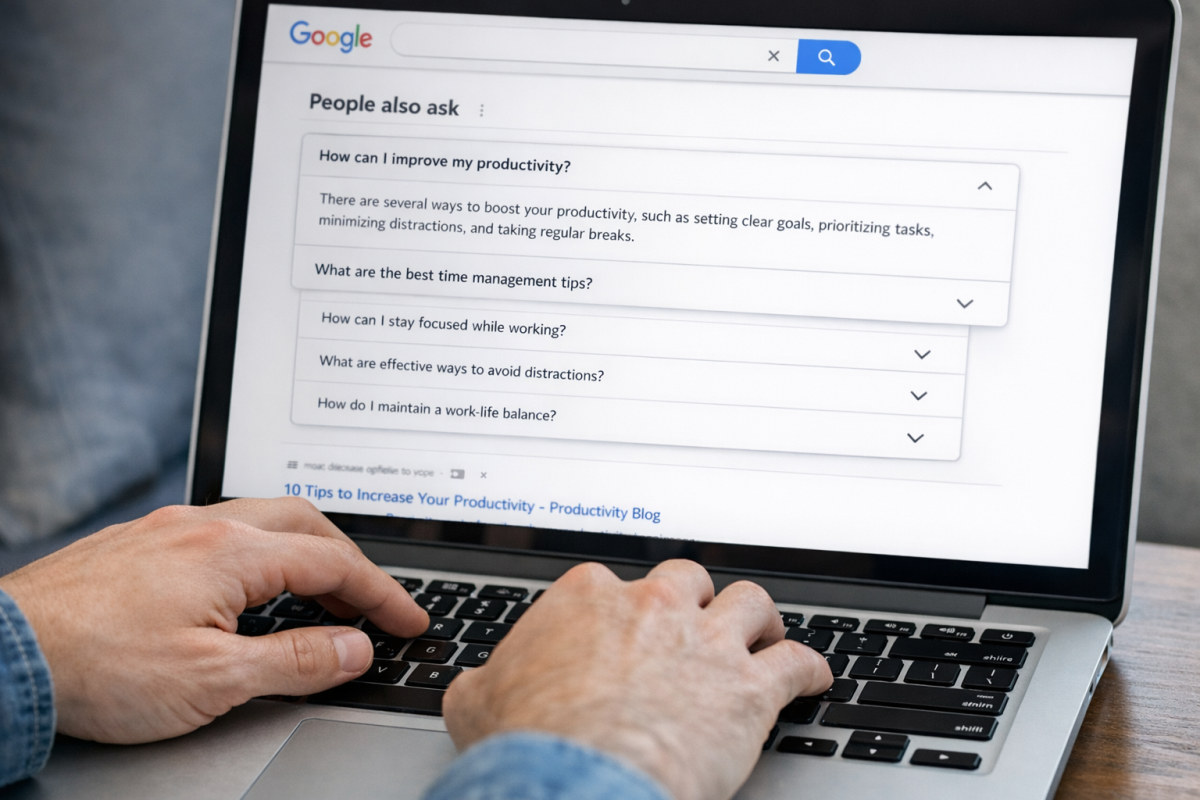
When a PAA box appears in search results, it starts with four questions related to your query, and each question sits in a collapsed row, and clicking one opens a short answer pulled directly from a web page along with a link to the source.
Here is how it works. Every time you expand a question, Google generates two or three new questions at the bottom of the box. The list is not fixed - it grows based on what you click, branching out into related territory as you go.
The box tends to appear near the top of the page, usually within the first few organic results, though it does not necessarily land in the same position. But it's usually above the fold or very close to it, which means it gets attention before a user even reaches the traditional blue links.
In terms of how widespread this feature is, the numbers tell the story. A 2020 Semrush study found PAA boxes appearing in 52.27% of mobile searches and 49.37% of desktop searches. That is already close to half of all searches across formats.
More recent data from Noozle puts those figures even higher - around 78% on desktop and 77% on mobile. The difference between the two studies likely reflects how much Google has expanded PAA use over the past few years.
| Source | Desktop | Mobile |
|---|---|---|
| Semrush (2020) | 49.37% | 52.27% |
| Noozle (more recent) | 78% | 77% |
What this shows is that PAA is a mainstream feature that appears in the majority of searches and sits in a position where users are almost certain to see it.
The expandable nature of the box is worth keeping in mind. Because it grows as users interact with it, the questions inside align with patterns in how people study a topic step by step.
Why PAA Is a Core Signal in Answer Engine Optimization
Tools like Google's AI Overviews, Perplexity and ChatGPT don't rank links the way a traditional search results page does. They pull answers, and they pull them from content that already has a track record of answering questions well.
PAA is part of that track record. When Google surfaces your content inside a PAA box, it's making a public statement that your page answers a question better than most; it's an actual signal for any system trained to find reliable answers.
Consider what AI tools are actually doing under the hood. They're trained on giant amounts of web data, and that data includes search patterns, question formats and the answers that search engines have historically favored. Content that fits a question-and-answer structure - and has been validated by appearing in PAA - is the content these systems learn to trust.

It tells you that your content is structured in a way that answer engines use.
It's built very around pulling direct answers from the web and citing its sources. The content it prefers tends to be question-aware and easy to extract meaning from - which is what strong PAA content looks like. Getting into PAA and cited by Perplexity aren't the same thing. But they reward the same underlying content properties.
Google's AI Overviews follow a similar logic. They pull from pages that Google already trusts to answer questions, and PAA performance is one way to read how much that trust exists for your content on a given topic.
If you're building a content strategy with AEO in mind, PAA is not a side metric to look at once in a while - it's a feedback signal that tells you if your content is doing the job that answer engines are looking for. The pages that land in PAA are the pages that AI-driven tools are most likely to treat as credible sources - use our AEO Readiness Checklist to see how well your content is positioned - it's a connection worth taking.
What a 3% Click-Through Rate Tells You (And What It Doesn't)
According to FirstPageSage, People Also Ask boxes have an average click-through rate of around 3%. That number can seem discouraging - and that's also the case if you're used to chasing traffic as the job.
CTR is only one way to measure what PAA does. In an answer engine world, visibility and clicks are not the same thing - and they don't have to be.
When your content appears in a PAA box, users see your brand name even if they never click. That exposure builds recognition over time - and it reinforces the idea that your site has something worth saying on that topic. Search engines take note of that too.
There's also the question of AI training signals. Large language models and answer engines pull from content that ranks well in structured formats like PAA. To get cited by an AI tool, a click doesn't always need to happen first - you just need to be the source that shows up.
Success in PAA real estate can depend on what you're after - and it helps to be honest about that to choose how to measure it.
| Goal | What PAA Can Do | Is CTR the Right Metric? |
|---|---|---|
| Drive direct traffic | Moderate impact - users may click through to your page | Yes, CTR matters here |
| Build brand exposure | Strong impact - your name appears with the answer | No, impressions matter more |
| Signal topical authority | Strong impact - repeated PAA presence reinforces expertise | No, ranking frequency matters more |
| Get cited by AI tools | High potential - structured answers are easy for AI to reference | No, source visibility matters more |
A 3% CTR from PAA is not a failure - it aligns with how users behave when they get a quick answer directly on the results page - they move on without needing to visit your site.
The value is still there - it just shows up in different places than a traffic report.
The Types of Questions That Appear in PAA Boxes
PAA questions tend to follow a small set of familiar formats. You will see "what is," "how to," "why does," and "can I" questions, and that's not a coincidence. These formats map directly to what people want when they type a query into Google.
"What is" questions are about definitions and background. Someone wants to know something before they go any further. "How to" questions signal that they are ready to take action. "Why does" questions come from people who want to know a cause or a pattern. "Can I" questions are about permission, possibility, or personal fit - and these like to show up quite a bit in health, finance, and legal topics.
What connects these formats is intent. Almost every PAA question is informational, which means the person is looking to learn something instead of to buy something. That shapes what content tends to win these places. Long sales pages and product descriptions don't get pulled into PAA boxes. Educational, explanatory content does.
This plays out differently across industries. In e-commerce, PAA boxes like to pull questions like "what is the difference between X and Y" or "how long does X last." In health, you get symptom and dosage questions. In finance, it's explanatory questions about how products or laws work. Local services like to draw questions about cost, process, and what to expect. The formats stay steady. But the subject matter changes to line up with the audience.
It is worth spending time looking at PAA boxes in your own niche. What formats show up most, and what does that tell you about where your audience is in their thinking? A lot of site owners focus on transactional keywords and then feel stuck when their content does not get traction. PAA patterns can be a helpful signal that there's a whole layer of informational content missing from their site. Finding the most popular pins on Pinterest is one example of how surfacing what people are already searching for can reveal those content gaps.
Google is basically showing you a map of how people think through a topic - what they want to know first, what follow-up questions they have, and what gaps they are trying to fill. The question formats are the framework, and understanding what these patterns mean is the starting point for deciding what to do with that information.
Finding and Targeting PAA Questions for Your Site
The most direct way to find PAA questions is to search for your main topic on Google and look at what appears in the box. Click one of the questions to expand it and watch how new questions load underneath - this chain reaction will teach you how Google groups related queries together, which is the information you'll need to plan your content.
You can also use tools like AlsoAsked, AnswerThePublic, or Semrush to pull PAA data at scale. These tools let you see which questions are attached to a keyword without having to click through searches one by one. That makes it much easier to map out a full topic before you start writing.
Once you have a list of questions, the move is to cluster them. Some questions are close enough in meaning that a single page can answer three or four of them at once. That is better than writing a separate page for each one because Google tends to favor pages that give a fuller picture of a topic.

Look for a question that helps frame your main heading and then treat the related questions as subheadings within the same page. A well-structured FAQ section or how-to post can pick up multiple PAA placements from a single URL. That multiplies your visibility without multiplying your workload. If you've recently changed a blog URL, keep in mind that PAA placements tied to old URLs will need time to reattach to the new ones.
Not every content format works equally well for every question type. The table below gives a few examples of how topic, common PAA questions, and content format tend to line up in practice.
| Topic | Example PAA Questions | Content Format That Tends to Win |
|---|---|---|
| Home insurance | What does home insurance cover? Is home insurance tax deductible? | FAQ page or definition article |
| Intermittent fasting | How long should you fast? What can you drink while fasting? | How-to guide with clear subheadings |
| Project management software | What is the best tool for small teams? How does it compare to spreadsheets? | Comparison article or structured FAQ |
| Dog nutrition | Can dogs eat rice? What foods are toxic to dogs? | Definition page with a list format |
The pattern here is worth mentioning. Factual or definitional questions do well on pages built around explanations. Process-based questions perform better in step-by-step formats. Matching your format to the question type is one of the more helpful things you can do at the research stage.
Structuring Content So AI and Google Both Pull From It
Knowing which questions to target is only half the work. The other half is formatting your content in a way that makes it easy for Google and AI systems to extract a clean answer.
The fastest way to earn a PAA placement is to put a direct answer right at the top of a section - one or two sentences that address the question head-on, followed by more detail below. Google needs to be able to lift that answer without any extra work on its part.
Use question-based subheadings
Structure your H2s and H3s as full questions where it makes sense. If someone searches "how long does it take to get a UK visa," your subheading should say that - this mirrors how PAA questions are phrased and makes your content much easier to match to a query.
Sentence structure matters more than you might expect. A direct sentence like "It takes between eight and twelve weeks to process a standard UK visa" is far easier for Google to pull than a long paragraph where the answer is buried halfway through.
Add FAQ schema to your pages
FAQ schema markup tells search engines that a block of content is structured as a question and answer - it does not guarantee a PAA placement. But it does make your content more readable to crawlers. You can add it to any page that has a question-and-answer format, which is the content you are already building.
The UK saw a 200% increase in PAA boxes after August 2018. That growth shows how fast this feature became a standard part of search results and why content structure has had to adapt to keep pace.
AEO and PAA want the same things
Answer Engine Optimisation is built on the same principles. AI tools like ChatGPT and Perplexity pull from content that's direct, well-structured, and easy to parse. If your page earns a PAA box, it's also more likely to be cited in an AI-generated answer.
The format that works for PAA is the same format that works for AEO: a question-based heading, a short direct answer, and a clean explanation underneath. You are not building two separate strategies here - you are building one piece of content that performs well across both.
Make the PAA Box Work for You, Not Just Around You
Understanding how PAA boxes work can give your content a real edge: learn how PAA boxes populate and expand, research the questions your audience is already asking, structure your answers so Google can surface them cleanly, and keep an eye on how this all feeds into long-term visibility across AI-powered search. None of this is going to need a content overhaul - it is going to need intention.
Start small. Pick one page and ask whether the content answers a question clearly and directly. If it does not, that's your next edit. If it does, find the next page. That is the whole game, repeated over time. If you are also building out a niche site from scratch, starting a blog that actually earns money covers how to approach content with purpose from day one.
FAQs
What is a People Also Ask box in Google?
A People Also Ask (PAA) box is a Google search feature displaying related questions with expandable answers pulled directly from web pages. It typically appears near the top of search results and dynamically generates new questions as users interact with it.
How often do PAA boxes appear in Google searches?
PAA boxes appear in the majority of searches. A 2020 Semrush study found them in roughly 49-52% of searches, while more recent Noozle data puts that figure closer to 77-78% across desktop and mobile.
Why does PAA matter for Answer Engine Optimization?
PAA placements signal that Google trusts your content to answer questions reliably. AI tools like ChatGPT and Perplexity favor the same well-structured, question-aware content that earns PAA spots, making PAA performance a useful AEO indicator.
What click-through rate should I expect from PAA?
PAA boxes average around 3% CTR. However, clicks aren't the only measure of value - PAA placements build brand visibility, signal topical authority, and increase the likelihood of being cited by AI-powered answer engines.
How should I structure content to win PAA placements?
Place a direct one-to-two sentence answer at the top of each section, use question-based subheadings, and consider adding FAQ schema markup. Matching your content format to the question type - definitions, how-to guides, or comparisons - also improves your chances.