





Getting the best return on your investment is the core desire for anyone using paid advertising of any sort. You're spending money, so you want to make as much in return as you can. Part of optimizing your ROI is knowing everything you can about how the ads system works.
One crucial element of Google Ads is the size of the various display ads you're able to use. Publishers need to know this so they know how much space to assign for ads on their site. Advertisers need to know this so they know how large their images should be. Google has quite a few different ad sizes, many of which are surprisingly similar, so it's best to get the dimensions straight from the horse's mouth.
Remember that these ad formats are not for Google's search result advertising. Those ad slots are text-only, as are several other formats for Google ads. If you want to use image ads where the dimensions matter, you need to choose that particular format of display advertising.
Before diving into the sizes themselves, a few important technical notes for 2026: Google restricts all display ad images to a maximum file size of 150 KB and only accepts images in PNG, GIF, or JPG formats. The Google Display Network now spans over 2 million websites and apps, reaching over 90% of internet users worldwide. Also worth noting: over 60% of Google Display Network impressions now come from mobile devices, which should heavily influence your format decisions when planning a campaign.
Google divides their ad sizes into three categories: "top performing ad sizes," "other supported ad sizes," and "regional ad sizes." The top performing sizes are where the vast majority of advertisers should focus their budget and creative energy.
Key Takeaways
- The 300x250 Medium Rectangle is the most common ad size, appearing on over 90% of display-enabled websites worldwide.
- Over 60% of Google Display Network impressions come from mobile, making the 320x50 mobile leaderboard essential for campaigns.
- All Google display ad images must be under 150KB and only PNG, GIF, or JPG formats are accepted.
- Smaller formats like the 125x125 button and 234x60 half banner rarely perform well and are generally not worthwhile investments.
- Regional ad sizes exist for specific countries, and matching local publisher norms can improve fill rates and performance.
Top Performing Ad Sizes
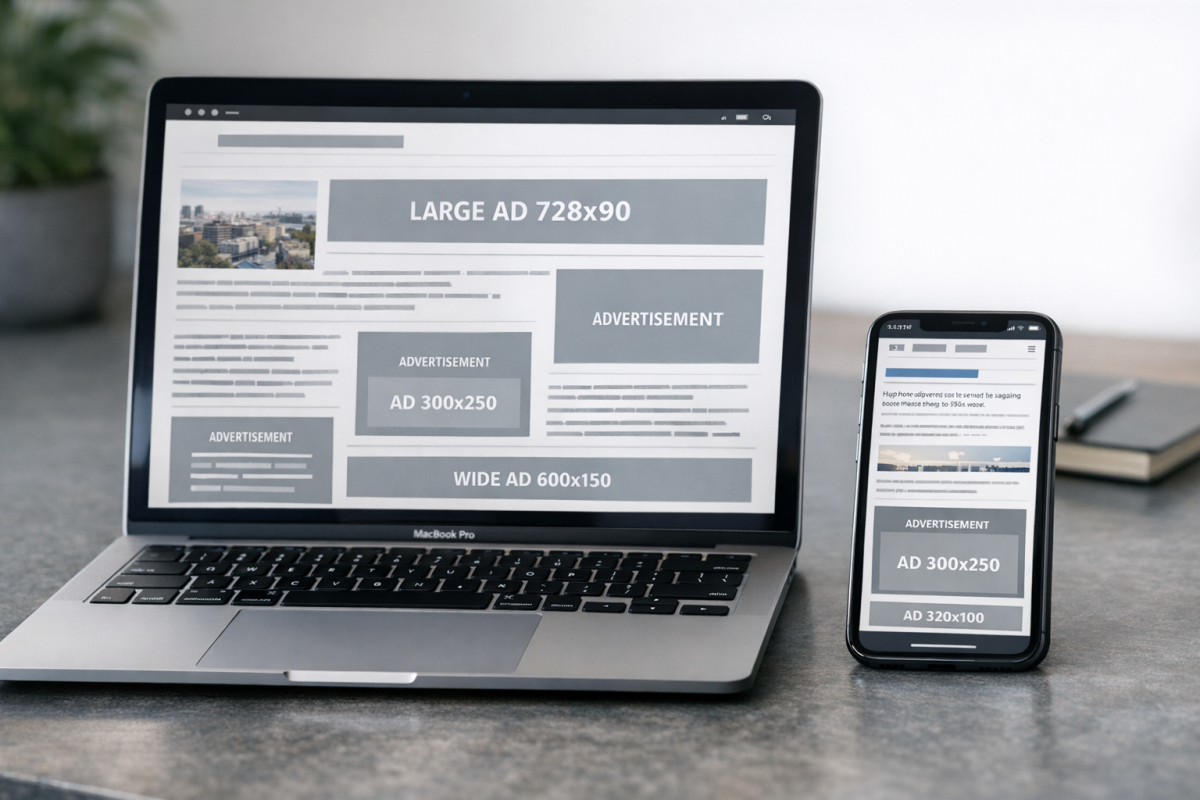
300x250 pixels. This format is known as the Medium Rectangle and is the single most common ad size Google offers. It appears on over 90% of display-enabled websites, making it essentially the universal standard for display advertising. As a publisher, it's a good option to choose because you're always going to have something to fill in the space. Since it's very common amongst publishers, advertisers have abundant inventory to fill. This format is available for text ads, display ads, and mobile ads. It tends to perform well when embedded within the text of articles, or when merged with a multi-column layout on a website's feed.
336x280 pixels. This format is slightly larger than the medium rectangle, being 36 pixels wider and 30 pixels taller. It is called the Large Rectangle and is another common ad format. Like the medium rectangle, the large rectangle performs well embedded within content. This format is available for both text and display ads. Availability on mobile may vary depending on placement, so verify your specific setup in the Google Ads interface.
728x90 pixels. This is the "leaderboard" ad format, widely recognized as a classic "banner" ad. It's very wide, not very tall, and forms a horizontal bar used in a wide variety of ways. You very frequently find this ad format placed above content or below it, as part of the navigation or in the footer. Sometimes you see these used in place of spacers in the middle of articles, but this can cause issues with users assuming the content has concluded. Be sure to encourage further scrolling if you use this format mid-content. These are available for text and display ads on desktop.
300x600 pixels. This is occasionally called the Half Page ad format, though many people simply think of it as that large ad to the side of the screen. These ads are tall and vertically oriented, often used to fill in whitespace alongside your main content that would otherwise just be empty gutter space on widescreen monitors. This format works with both display and text ads and continues to grow in popularity as advertisers seek more prominent placements.
320x50 pixels. This is the "mobile leaderboard" and one of the five top-performing ad sizes as of 2026. It is squat, very wide, and designed specifically for mobile browsing. It commands roughly 12% of global mobile display impressions, making it an essential format for anyone targeting mobile audiences. Given that mobile now accounts for over 60% of Display Network impressions, this format deserves serious attention. It is used at the top of content or in the footer at the end of content on mobile devices. Note that in earlier versions of this guide, the 320x100 large mobile banner held a spot in the top performing list; while it remains a supported format, Google's current top five prioritizes the 320x50 instead.
Other Supported Ad Sizes

320x100 pixels. This is known as the "large mobile banner" ad format, available for mobile ads. It is double the height of the 320x50 mobile leaderboard, offering more visual real estate for mobile viewers. It remains a solid option for mobile-focused campaigns where you want to stand out from the more common 320x50 format.
468x60 pixels. This is the format Google specifically calls the "banner" ad format, not to be confused with the leaderboard. Like the leaderboard, it is short but wide, though not quite as wide, making it more accommodating to narrower website layouts. This format is available for desktop display and text ads, but not for mobile. Google has noted that this ad format has been declining in popularity for years, and inventory tends to be limited. Fewer publishers are using it, fewer advertisers are paying for it, and it should be treated as a legacy format.
234x60 pixels. This is exactly half as wide as the banner format and the same height, fittingly labeled the Half Banner. It's designed to fit in smaller spaces than the usual banner ad, but its small size makes it prone to being overlooked. It does not work for mobile advertising.
120x600 pixels. The official name for this ad format is the Skyscraper. It is narrow and very tall, essentially a banner turned on its side. As a desktop-only display ad, it allows you to take up some sidebar space without dominating it with something as large as the half page ad. However, it is a less popular format than the half page, which leads to lower average ad performance.
120x240 pixels. This is the "vertical banner," which suffers from being too small to capture meaningful attention. Its small size, limitation to desktop-only display advertising, and unusual dimensions mean it is not well suited for modern web advertising outside of very specific circumstances.
160x600 pixels. This format is slightly wider than the skyscraper and serves as a middle ground between the skyscraper and the half page. The wider space allows more creative flexibility while still being narrower than the more dominant half page format. It tends to have decent inventory available and is a reasonable choice for publishers with sidebars to fill. It's available for desktop advertising.
300x1050 pixels. This is the "portrait" advertising format. It is not very wide but extremely tall. These are brand-centric placements that tend to work best when run alongside specific branded content or sponsored posts. Some sites use these as a pseudo-background element in the gutter space of a centered page, making it look as though the ad content is peeking out behind the page content. This is not available for mobile advertising. Publisher supply for this format remains relatively limited, which can work in favor of publishers who are configured to run them.
970x90 pixels. This is occasionally called the Large Leaderboard format. It is a very wide desktop banner suited for high-visibility placements at the top of a page. This format is often used to display video, animations, and app advertising that tends to be very dynamic by its nature.
970x250 pixels. This is a billboard ad with the same basic proportions as a roadside billboard. It is very wide and quite tall, making it a very prominent placement. It performs best at the top of a page, since it will often be cut off below the fold. This is a format where advertiser demand has historically outstripped publisher supply, putting publishers in a good position to earn from it.
250x250 pixels. This is simply called the Square ad format. It fits into spaces that aren't wide enough for banners or tall enough for skyscrapers, and it's large enough that it is not entirely ignored the way smaller formats tend to be. It is available for both desktop and mobile ads.
200x200 pixels. This is the "small square," smaller than the base square format. It shares the same general versatility as the square, though its smaller size makes it more likely to be overlooked. It is available for both desktop and mobile ads, but supply tends to be limited.
180x150 pixels. This is the Small Rectangle. It can fit into small spaces, but that is often a detriment to performance. It doesn't tend to perform very well and may eventually be deprecated.
125x125 pixels. This is the "button" ad format, essentially a very small square. It doesn't perform well and is limited to desktop advertising only. It remains listed as a supported format, but is rarely a worthwhile investment for most advertisers.
Regional Ad Sizes

I'm not going to go over every regional ad size variation, because there are a lot of them. Google Ads makes certain specific ad sizes available in different countries, because different regions tend to have different preferred website layouts. For example, the most popular ad size in Russia is 240x400 pixels, called the vertical rectangle. Google also provides a few specific formats exclusively for use in Poland. Regional ad sizes are worth reviewing if a significant portion of your audience is concentrated in a specific country, as matching local publisher norms can improve both fill rates and performance.

2 responses
Thoughtful replies only - we moderate for spam, AI slop, and off-topic rants.
Excellent Article and a fantastic find. You have saved me a lot of time experimenting with many sizable ads, thank you very much.
Oh, and a Happy New Year.
Thanks so much, Mark! So glad the guide saved you some time - that's exactly what we hoped it would do! Experimenting with ad sizes can definitely become a rabbit hole, so hopefully this helps you hit the ground running. Wishing you a wonderful New Year as well! Here's to a successful and productive year ahead! 🎉