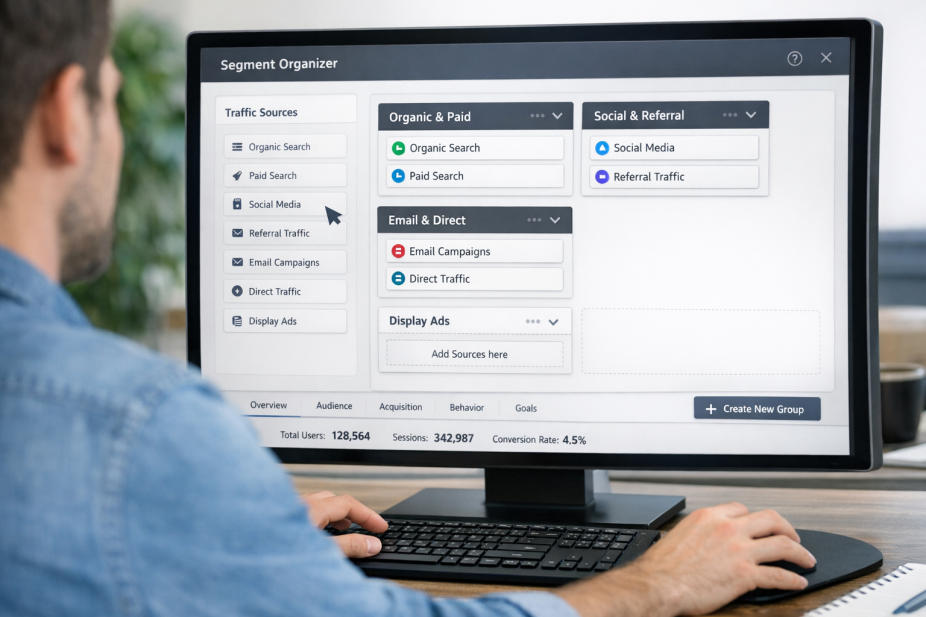
The reason they're in the dark comes down to a default GA4 behavior: traffic arriving from AI platforms gets quietly absorbed into the Referral channel, where it disappears into a sea of forum links, partner sites, and miscellaneous sources. There's no automatic flag, no dedicated bucket, no alert. Unless you go looking for it specifically, AI-driven traffic is basically invisible.
That invisibility is a problem worth fixing, because this traffic behaves differently - meaningfully differently. Visitors arriving from AI tools convert at an average rate of 14.2%, compared to roughly 2.8% for organic Google traffic. These aren't window shoppers. They've already interacted with an AI that surfaced your site as a relevant answer to something they were actively trying to solve. They arrive ready.
I'll walk through how to break AI-sourced traffic out into its own channel inside GA4 - channel groupings, custom segments, and a few configuration adjustments that take less time than you'd expect. Once it's set up, you'll finally be able to see what AI platforms are actually driving for your site, and make decisions based on data that was always there, just never labeled.
Key Takeaways
- GA4 automatically buries AI platform traffic inside the Referral channel, making it invisible without manual configuration.
- AI-referred visitors convert at 14.2% on average, compared to just 2.8% for organic Google traffic.
- Creating a custom GA4 channel group using "session source contains" conditions separates AI traffic into its own trackable bucket.
- Claude converts at 16.8%, outperforming Perplexity (12.4%), so tracking AI sources individually reveals meaningful performance differences.
- UTM parameters can recover some lost AI traffic data, but only on links you personally control and distribute.
Why GA4 Hides AI Traffic by Default and What That Costs You
GA4 sorts incoming traffic into channels using a set of built-in rules. When a visitor arrives from a domain that doesn't match any recognized channel definition, GA4 dumps it into the Referral bucket; traffic from tools like talk.openai.com or claude.ai gets lumped in with random website referrals and disappears into the noise.
This isn't a bug or an oversight on Google's part. GA4 simply hasn't updated its default channel groupings to reflect how people actually browse the web. AI assistants are a pretty new traffic source and the default rules predate them. So unless you manually create a custom channel, you'll never see AI as its own line item in your reports.
That matters more than it might seem. According to the 2025 Previsible AI Data Study, AI-referred traffic grew 527% year-over-year - it's a traffic source that's expanding fast enough to move the needle on your numbers.
The conversion gap makes this even harder to ignore. The same study found that visitors arriving from AI tools convert at 14.2% on average. Compare that to Google organic traffic, which converts at around 2.8%, and the problem becomes clear. If a chunk of your highest-converting visitors is buried inside a generic Referral report, you have no way to act on that information.

Without a separate AI channel, you won't know which AI tools send the most visitors, which pages they land on, or how long they stay. You also won't know if a content change helped or hurt your visibility in AI-generated answers.
That's a business cost. You could be making content that performs well in AI tools and driving conversions without realizing it, which means you can't double down on what's working. Or traffic from AI could be quietly declining and you'd have no way to connect that drop to a cause. In either case, the gap in your data is a gap in your ability to make decisions.
Which AI Tools Are Actually Sending Traffic to Your Site
A handful of AI platforms are responsible for most of the referral traffic you're probably missing right now. The main ones to know are ChatGPT (talk.openai.com), Claude (claude.ai) and Perplexity (perplexity.ai). There are others - Gemini, Copilot and a few smaller tools - but these three are where the bulk of AI-driven visits come from.
ChatGPT sends the most traffic by a wide margin - it accounts for roughly half of all AI referral traffic across the web, which makes sense given how many people use it every day. Claude and Perplexity each send a smaller share. But that doesn't mean they're worth ignoring.
The differences become clear when you look at conversion rates by source.
| AI Source | Traffic Share | Avg. Conversion Rate |
|---|---|---|
| ChatGPT | ~50% of AI traffic | ~14.2% (blended avg.) |
| Claude | Smaller share | 16.8% |
| Perplexity | Smaller share | 12.4% |
Claude converts at 16.8% on average, which is noticeably higher than the blended ChatGPT average of 14.2%. Perplexity sits lower at 12.4%; it's a difference between the top and bottom, and it's the thing you lose sight of when GA4 lumps these into one vague "referral" bucket.
A visitor from Claude is more likely to take action on your site than a visitor from Perplexity. If you're running campaigns, testing content, or just trying to know what's working, treating them like one group means you're making decisions based on an average that doesn't represent any single source accurately. Tracking users and visitors accurately is what makes the difference between useful data and noise.
Each one of these platforms also sends traffic for different reasons. ChatGPT users follow links from conversational answers. Perplexity is more search-oriented, so users arrive with a research mindset. Claude skews toward users doing focused, job-oriented work. The intent is different, the behavior on-site is different, and the conversion outcome is different - which is why separating them in GA4 is worth the setup time. Understanding the difference between good traffic and bad traffic helps you act on that data once you have it.
How to Set Up a Custom Channel Group for AI Traffic in GA4
Now that you know which sources to watch, it's time to build the structure that separates them in your reports. GA4 lets you create custom channel groups, and this is where you can pull the AI sources into one dedicated place.
Head to Admin in GA4, then go to Data Display and choose Channel Groups. From there, hit "Create new channel group" and give it a name you'll recognise later - something like "AI Referral Sources" works fine. GA4 allows as many as 25 channels per group, so you have plenty of room to work with.
Here is the process to set up your AI channel.
- Click "Add new channel" inside your group.
- Name the channel - "AI Traffic" or "Generative AI" are both good options.
- Set the condition type to "Session source" and use the "contains" operator.
- Add a value for each AI platform, such as "openai", "claude.ai", "perplexity.ai", or "gemini.google.com".
- Use "OR" logic between each source so they all fall under the same channel.
- Save the channel, then save the group.
The "contains" operator has the best coverage here because source strings don't always appear in a clean, predictable format - it captures more results than "exactly matches" without requiring extra effort.

One mistake worth flagging: some people add only the most well-known tools and leave out smaller AI platforms. Sources like "you.com", "phind.com", or "kagi.com" send traffic too - even if the volume is lower. Go back to your referral source list from the previous section and make sure every AI tool you spotted is included as a condition.
The other common mistake is going too broad with conditions. If you set the source to contain just "ai", you'll accidentally scoop up unrelated sources with those letters in the domain. Be specific with each value you enter. If you want to avoid other common errors, it's worth reviewing mistakes that trip up even experienced advertisers.
Once the group is live, it won't apply retroactively - it only takes effect from the date you create it. So the sooner you set this up, the more data you'll have to work with going forward.
Using UTM Parameters to Fill the Gaps AI Tools Leave Behind
Even with a GA4 channel group in place, some AI-driven traffic will still slip through the cracks. The reason is that AI interfaces don't pass referrer headers when a user clicks through to your site. If you don't have that referrer data, GA4 has nothing to work with, so the visit gets logged as direct traffic instead.
This isn't a GA4 flaw - it's just how some AI tools are built. Chat-based interfaces like Claude or Perplexity don't always behave like a standard web browser, and that means the referral signal your analytics can depend on never arrives.
UTM parameters help you recover some of that lost visibility. But only in situations where you control the link. If you publish content that gets shared or syndicated, you can add UTM tags to those URLs before they go out. That way, even if the referrer gets stripped somewhere along the way, GA4 still has campaign data to fall back on.
A helpful setup might look like this: use utm_source=ai-newsletter or utm_medium=ai-content on any links you distribute through AI-adjacent channels - think prompt libraries, AI tool directories, or partner content. It won't capture everything. But it gives you a named source to track instead of a pile of mysterious direct sessions.
The honest limitation here is that you can't tag links inside ChatGPT's replies or any AI-generated output you don't control. If someone asks an AI tool a question and it links to your site, that link was generated by the model - you had no hand in building it, so there's no UTM to add.
What you can do is think about the content you intentionally put into circulation. Press releases, guest posts, downloadable resources, and shared templates are all candidates for UTM tagging because you own the URL before it goes anywhere; it's where this actually has teeth.
| Scenario | Can You Add UTMs? | Tracking Outcome |
|---|---|---|
| Link in your published article | Yes | Campaign data visible in GA4 |
| Link in AI-generated response | No | May show as direct or referral |
| Link in a shared resource you created | Yes | Campaign data visible in GA4 |
| Link surfaced by an AI tool's index | No | Depends on the tool's referrer behavior |
UTM tagging is a way to protect the traffic data you have the ability to influence - it won't give you a complete picture on its own. But paired with your GA4 channel group, it closes a few more gaps than either strategy would alone.
Turning AI Traffic Visibility Into Smarter Content Decisions
From there, compare engagement quality across your segments. AI-referred visitors tend to arrive with higher intent, and that benefit shows up in conversion rates. If you're seeing actual differences in how this audience behaves versus organic or paid traffic, factor that into where you invest your content and optimization work. A visitor who arrives already primed by an AI recommendation is worth more.
This channel is still in its early stages, but the numbers make a strong case for taking it seriously. With 63% of sites already registering AI-driven traffic, this is already shaping how people find and connect with content. Getting your tracking in place means you'll have historical data to draw on as the channel matures, putting you well ahead of competitors who haven't started paying attention yet.