





Key Takeaways
- AddToAny leads the pack with 500,000+ installs, 4.8-star rating, and support for over 100 social networks.
- Sassy Social Share and AddToAny both support 100+ platforms, making them top choices for maximum network coverage.
- Mashshare prioritizes speed and performance, important in 2026 as page performance directly affects search rankings.
- StatCounter and Post Views Counter focus on analytics rather than social sharing, offering visitor tracking and view counts instead.
- Displaying zeros across many share buttons can backfire, so choosing a focused, well-maintained plugin matters.
Remember the days of the hit counter? Back then, it seemed like every site would have a little number in their footer which shows how many had visited their site over the previous years. The number was basically meaningless, of course - it was just an incremented graphic that rolled up each time - or something - visited the page. You could sit there and refresh the page to add to it, and sometimes you didn't even have to. Even bots loading the page counted. They weren't well-developed scripts.
These days the hit counter is long gone, a relic of Geocities and hand-coded pages running frames. Still, I'm here to tell you that you can re-live the glory days in an interesting way. That way is through a share counter.
What is a share counter? You've seen them. They're literally everywhere. Also known as a social sharing plugin, a share counter is a plugin for your site that runs social network sharing buttons. A share counter, specifically, lets you show the number of shares a given post has when the plugin is active.
You'll see these on just about every blog. Sometimes they're under the post title, sometimes they're a sidebar that floats down the page, sometimes they're in the footer or the end of the post. They look different from case to case. But they all have two things in common. First are the social sharing buttons, ranging from Facebook and Instagram to giant piles of no-name social networks no one uses. The other is the number, next to each icon, showing the number of shares that link has.
I've seen some plugins, and some bad ones. Some of the worst are almost hilarious when they fail. Ever seen a post with 20+ legends at the bottom that lets you share the post on every possible social media site, proudly showing the number of shares it has on every one of the sites? In most cases, those numbers are straight zeros - it's not the social proof you were hoping for.
It's also worth mentioning that the social sharing community has changed dramatically over the years. Google+ is long gone. Twitter has rebranded to X. TikTok, Threads, and Bluesky have all entered the picture as places worth supporting. Any plugin you choose in 2026 needs to go well with that reality.
Anyway, here are five of the best social counter plugins available right now. Let me know what you think! I always like to play around with new plugins, so if you love one I haven't mentioned, let me know.
AddToAny
AddToAny has been around since 2006 and has quietly become one of the most reliable and widely used social sharing plugins in the WordPress ecosystem. With over 500,000 active installs and a great average rating of 4.8 out of 5 stars on WordPress.org, it's earned its reputation the hard way.

What makes AddToAny stand out is its breadth - it supports over 100 social media network buttons, which means you're covered if your audience is on Facebook, X (formerly Twitter), LinkedIn, WhatsApp, Threads, Bluesky, Pinterest, or just about anything else - it's legitimately one of the most complete options available.
The plugin is lightweight, fast, and designed not to slow your site down - it's also privacy-friendly, with options to run without sending data to third-party servers. For most bloggers, the free version will cover everything you need right out of the box.
Sassy Social Share
Sassy Social Share is a strong contender for anyone who wants large platform coverage without sacrificing style - it supports 110+ places - like Facebook, X, Google, LinkedIn, Pinterest, WhatsApp, and more - which makes it one of the most complete options available in terms of raw network support.
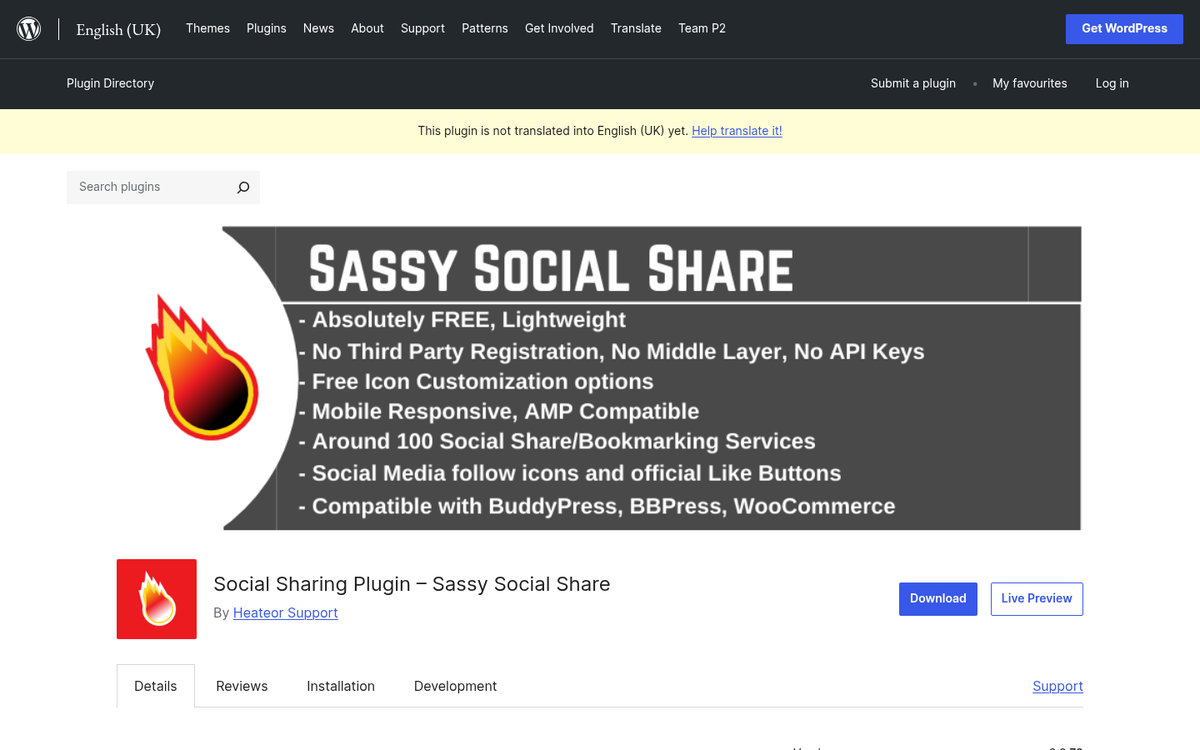
The plugin has a clean, modern look and it's very customizable in terms of button shape, size, and placement. You can put sharing buttons above or below your content, you can use a floating sidebar, or add them manually via shortcode - it's easy to configure without touching any code.
Sassy Social Share is free, which makes it an easy recommendation for bloggers who want maximum platform coverage without opening their wallet.
Mashshare
Mashshare has been around for a while and remains one of the more polished-looking social sharing plugins available - it's built for speed and designed to be as lightweight as possible, which matters quite a bit in 2026 when Core Web Vitals and page performance directly affect your search rankings.

The plugin focuses on the networks that actually drive traffic instead of padding out its list with obscure places no one uses - it supports Facebook, X, WhatsApp, and others, and its clean share count display is easy to read at a glance. The free version is solid, and the premium add-ons give you extra networks, click-to-tweet functionality, and more granular customization options.
If you want something that looks sharp and loads fast without bloat, Mashshare is worth a look.
StatCounter
StatCounter takes a slightly different angle compared to the other plugins on this list. Rather than focusing purely on social sharing buttons, it functions more as a visitor tracking and analytics tool, offering a behind-the-scenes look at how people are actually interacting with your content.

With over 100,000 active installations on WordPress, it's a proven and trusted option. If you're nostalgic for the hit counter era but want something that actually gives you real data, StatCounter scratches that itch nicely. You get visitor counts, traffic sources, and engagement metrics, all displayed in a clean dashboard.
It pairs well with a dedicated social sharing plugin if you want the public-facing share counts and the private analytics running together.
Post Views Counter
Post Views Counter is another plugin that leans into the analytics and visibility side of things, and it does it cleanly. Also sitting in the 100,000+ active installs category, it's a well-maintained plugin that lets you display a post view count directly on your content, a modern and faithful take on the old hit counter concept.

You can control who counts as a view (logged-in users, guests, bots, or any combination); the count displays and how it looks - it integrates well with most themes and page builders, and the free version is legitimately capable without feeling stripped down.
For bloggers who want to show readers that a post is popular without relying only on social share numbers, displaying a view count can be a helpful trust signal.



3 responses
Thoughtful replies only - we moderate for spam, AI slop, and off-topic rants.
Hi James
Thanks for the information, I just want to know that which plugin you have used in this website for sharing and showing count
Thanks
Ashish
We have same question...
Hi Ashhish / Nurudin! We use Social Warfare by Warfare Plugins.