Key Takeaways
- Zapier can automatically share new blog posts to social media platforms like Facebook, LinkedIn, Threads, and Bluesky via RSS triggers.
- Event promotions can be automated using calendar integrations, scheduling multiple reminders weeks before a release date.
- Zapier can monitor brand mentions across platforms like Reddit, sending alerts to Slack, email, or Google Sheets.
- Content curation workflows can be partially automated by aggregating RSS feeds and ideas into centralized documents or scheduling tools.
- Leads from Facebook or LinkedIn ads can be automatically captured and funneled into email marketing platforms or CRMs.
Zapier is a great automation engine for any app that has an API it can access. They have thousands of integrations you can use to put together automation recipes - actions that trigger when you post a new blog post or perform some other action. Done appropriately, it can save you quite a bit of time and energy.
The Usual Warning
In moderation, it's fine to automate parts of your business. However, if you get carried away, it's very easy to alienate your users, drive away traffic, and hurt your brand.
For example, it's a good idea to send a welcome drip campaign to new email subscribers. But social media users usually hate automated DMs when they follow you. Automating basic customer service can be fine. But if you're sending a generic "thanks for flying with us" reply to user complaints, you're going to be called out on it.

There are a number of terrible things you can do with automation, such as automating your blog content itself with low-quality AI-generated text - it's best to stay away from those kinds of shortcuts and follow easier, more helpful time-saving processes instead.
Here are five ways you can use Zapier to automate some processes, without jeopardizing your audience or your traffic.
1. Share New Posts on Social Media
Pretty much every blog system has an RSS feed set up - even if you don't know where it is or actually use it - it's just part and parcel of running a blog. This first Zap is going to need to know what your RSS feed is, because it will take data from RSS and post it on social media.
The trigger for this Zap will be a new post appearing on your RSS. You can customize this in a few ways, like requiring the post come from a specific author - it helps remove errors where a post is shared even though it was just edited.
Next you'll have to specify your actions. With over 5,000 app integrations available on Zapier, you have no shortage of destinations to post your content - this only works for sites that have a posting API or posting strategy Zapier can access, so some niche social networks might not be available.
At the very least, you are probably going to want to set up Zaps to post on Facebook, LinkedIn, and newer places like Threads or Bluesky, which have grown. Facebook has multiple possible targets you can use: organic Facebook profiles, Facebook pages, and Facebook groups.
Other social networks you can Zap to include Instagram, Reddit, LinkedIn, and Pinterest. Zapier also integrates with tools like Buffer and Hootsuite, which opens up even more downstream social networks from a single Zap.
The best part about Zapier for this job is that you can customize the content that appears on each social network. You aren't just posting a plain old link; you can adjust what content is added to the link, what format the link takes, and what the description looks like, and each post can be customized to the platform it's going to.
2. Promote Events
There are a number of reasons you might promote an event, on your blog and on social media, and Zapier makes it easy. Don't skip this entry if you're thinking an "event" means a big media fair, convention, or product release. In fact, you can use an event to mean anything you want.
One idea I've used occasionally is to make an event for a big eBook release. I spend quite a bit of time and energy creating an eBook, commissioning a cover for it, writing and optimizing the copy for the store page, and the rest. Now I have to promote it. I can make blog posts talking about how I've worked on it and what's coming. But that only goes so far.
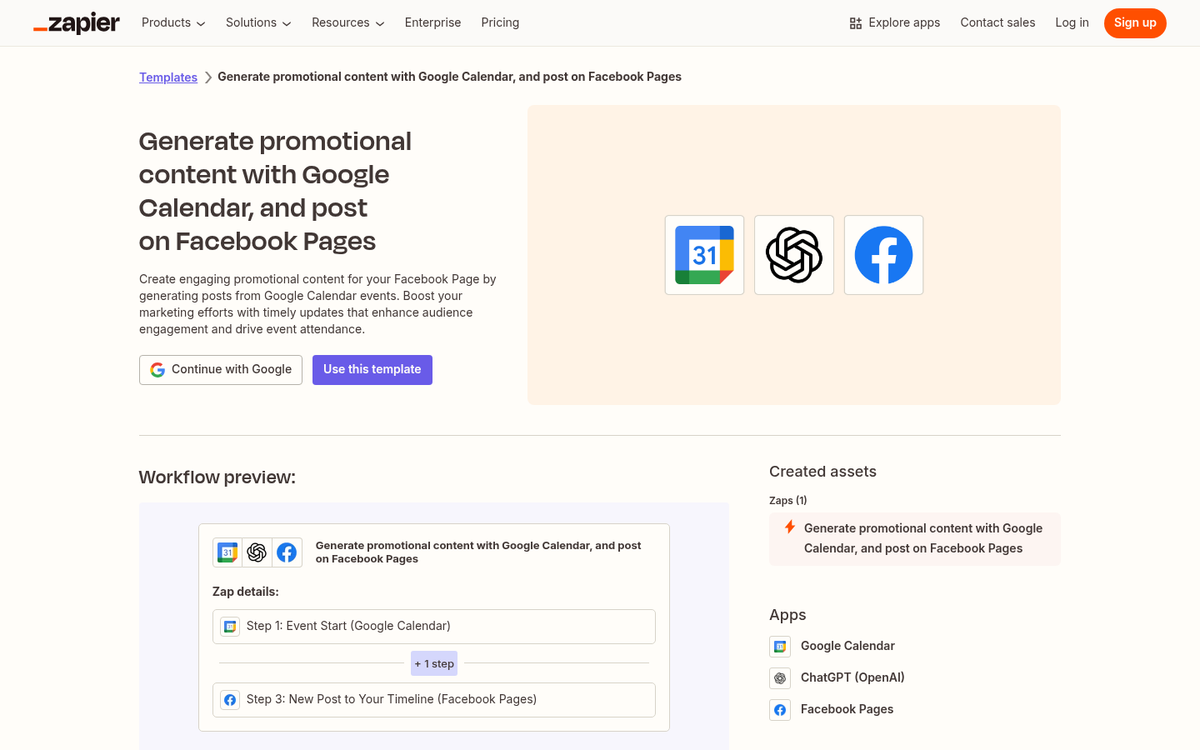
The trigger for this Zap will be calendar integration. Zapier has a few different calendars you can choose from, the biggest being Google Calendar, which is used by hundreds of millions of people. You can also use scheduled Zaps via the built-in Schedule by Zapier tool, which works for recurring promotion sequences.
As for the action the Zap triggers, you want to have figured out where your promotion is best seen and how to put it forward. The general social media list is a good idea; anyone following you on social media will get their fill of you promoting your new eBook. LinkedIn, Facebook, and Instagram are all destinations. Don't forget to supplement this with paid ads on your given social networks for that extra bit of promotion!
You don't have to just promote the event once. One trick I like to use is to set up calendar reminders a month in advance, two weeks in advance, a week in advance, a few days before, the day before, and the day of the release, and each of them can trigger a Zap with a message previewing your upcoming release. The best part is, all you have to do is customize the alert you get in your calendar - that alert can become the basis for what is posted to your social feeds via Zapier.
3. Keep an Eye on the Situation
One core component of any marketing strategy is an awareness of the community and the general perception of your brand. You want to know as much as possible about what's going on in your community and how they think of your performance, so you can adapt to changing perspectives. If they think your marketing is too pushy, dial back on it. If they think your products are lacking, figure out their complaints and improve upon them.
While Zapier is usually used to push marketing actions, you can use it as a passive feedback service as well. There are a few ways you can do this.
For one thing, you can set up a number of different feedback and monitoring triggers. You can have a trigger for when your brand is mentioned on places like Reddit or through integrated monitoring tools, and you can set up filtered Zaps that only fire based on keywords or conditions - this helps remove false positives and nonsensical mentions.
You can also set up Reddit mentions and other types of mentions as Zap triggers. It helps you keep an eye on when people are talking about you across different channels.

As for results, you can set up all sorts of different actions. You can have any mention added to a spreadsheet in Google Sheets so you can see everything at a glance. You can get email notifications when you're mentioned. You can get notifications in Slack. There are plenty of options available to you.
One thing to keep in mind is that this won't be perfect. Dedicated social feedback services will outperform Zapier for this task and give you features like sentiment analysis, advanced filtering, and trend tracking. That said, Zapier is considerably cheaper. Paid Zapier plans start around $19.99 per month - business-grade social feedback tools can cost more. For smaller blogs and businesses, Zapier's monitoring capabilities are usually more than enough.
4. Curate Content
Curating content is a way to fill out your social media feeds with value that you don't have to produce yourself. Curation helps you network with the people creating that content, gives your audience something to enjoy between your blog posts, and makes your brand pages look less self-promotional. Learn more about the best content curation platforms for content marketers.
You can use Zapier to assist with a content curation process.

Some ideas:
- Sync up an ideas document in Notion or Evernote with something like Buffer or Google Sheets to keep your data in one place.
- Use a Google Sheet with content ideas to update Buffer for social media curation.
- Add the RSS feeds from other blogs into a single central document you can pull from for future curation.
- Automatically save content posted by others that mentions your brand, so you can review and engage with it later.
Essentially, as long as you have a process that's more structured than "I like this post so I'm sharing it", you can automate at least part of it with Zapier - even if that automation just means turning a dozen different information sources into one main directory you can browse for content to share.
5. Capture and Nurture Leads from Social Campaigns
Running paid social campaigns - whether on Facebook, LinkedIn, or elsewhere - means you're generating leads that need to be captured and followed up with quickly. Zapier makes it easy to connect those lead sources directly into your marketing stack without any manual data entry.
This Zap helps you keep track of leads. When someone fills out a lead form on Facebook Lead Ads or LinkedIn Lead Gen Forms, just to give you an example, you can have Zapier automatically pull that contact information and add them to your email marketing platform of choice - whether that's Mailchimp, ConvertKit, ActiveCampaign, or another service. From there, trigger a welcome or onboarding drip campaign to warm them up - this also helps you filter out unengaged leads; those who aren't interested will unsubscribe early, keeping your list clean and your metrics accurate.
That's just one example of a wider lead accumulation strategy. When someone engages with you through any channel you have connected to Zapier, you can add their contact information to a Google Sheet or directly into your CRM for follow-up. Whether your leads are coming from webinar registrations, content downloads, or social ad clicks, Zapier can funnel that data into a single organized place automatically.
Zapier is a very powerful engine if you take the time to figure out what you want to do with it. I've only listed a few options here. With access to over 5,000 app integrations and the ability to build multi-step Zaps, you can create highly automated processes running silently based off a single trigger.
Have you used Zapier, or looked into their app library? What's the most helpful Zap you've found and used? I'd like to know.