Both tools are genuinely good. Elementor and Divi have earned their popularity and in 2026, have matured into capable platforms that can produce fast, polished, high-converting landing pages. Neither is a bad choice in absolute terms. But that doesn't mean they're interchangeable - and picking the wrong one for how you work can cost you time and money.
The honest answer is that the better tool depends on your workflow, your budget, how much flexibility you need and how much difficulty you're willing to manage. A freelancer building client pages on tight deadlines has different goals than a small business owner who wants to control their own marketing without touching code. Those differences matter and they should drive the choice.
I'll break down both builders where it counts for landing pages - design flexibility, speed, ease of use, pricing and everything in between. By the end, you'll have a clear enough picture to stop debating and start building.
Key Takeaways
- Elementor scores higher on mobile PageSpeed (74 vs 64) while Divi loads faster raw (0.891s vs 1.14s).
- Divi's lifetime license (~$249) suits agencies; Elementor Pro (~$59/year) fits single-site freelancers better.
- Elementor offers wider native integrations with email and CRM tools; Divi often requires Zapier or extra plugins.
- Elementor uses a structured widget panel; Divi uses inline editing, suiting different working styles and instincts.
- Both builders recommend testing first-Divi offers a 30-day refund, Elementor has a usable free version.
How Each Builder Approaches Landing Page Design
Elementor and Divi take different paths to get you to the same destination. Elementor is built around a widget-based drag-and-drop system where you pull elements from a panel on the left and drop them onto your page. Divi uses a visual builder too. But it centers on inline editing - you click directly on text or an element and edit it right there on the canvas.
That difference matters more than it sounds. With Elementor, your editing panel and your canvas are two separate things working together. With Divi, the page you see is more directly the page you're editing, which some find more intuitive and others find a little cluttered.
Building in Elementor
Elementor's free version comes with 30 widgets, covering the basics like headings, buttons, forms, and image blocks. The Pro version expands that to 98 widgets total, which gives you quite a bit to work with on a landing page without reaching for third-party plugins. If you want a countdown timer, a price table, or a form with conditional logic, it's already there in the panel waiting.
The layout feels structured and predictable. You build in sections, then columns, then drop widgets inside those columns - it takes about 20 minutes of study before it starts to feel natural and you get comfortable with it faster.
Building in Divi
Divi's strategy feels more fluid in some ways. You click on text to change it, drag rows around, and adjust settings in a floating panel instead of a fixed sidebar - it also comes with a large library of pre-built layouts for landing pages, which is a good starting point if you want to move fast.
The inline editing can seem freeing. But it sometimes gets in the way when you want to make precise structural changes. Selecting nested elements or moving things between sections takes a bit more effort than you'd expect.
What It Actually Feels Like
Elementor feels more like assembling a page. But Divi feels more like sculpting one. Neither is harder to learn in an absolute sense - they just reward different instincts. Someone who likes organized panels and a separation between controls and content will lean toward Elementor. Someone who prefers to work directly on the page will feel more at home in Divi. If you're still deciding on an approach, it helps to understand which landing page layouts tend to drive the most sales before committing to a builder.
Page Speed and Performance on Landing Pages
Speed matters on landing pages more than almost anywhere else on a site. Every extra second of load time gives visitors a reason to leave before they ever see your offer.
In a SeedProd performance test, Divi loaded in 0.891 seconds with a page weight of 407 KB. Elementor came in at 1.14 seconds and 535 KB. Those gaps are not giant. But on a landing page built to convert, they are worth mentioning.
| Metric | Elementor | Divi |
|---|---|---|
| Load Time | 1.14s | 0.891s |
| Page Weight | 535 KB | 407 KB |
| Mobile PageSpeed Score | 74/100 | 64/100 |
| FCP on Complex Pages | Within range | 50% over recommended |
The story flips when you look at Google PageSpeed mobile scores. Elementor scores 74 out of 100. But Divi sits at 64. Mobile performance is a factor here because a large share of landing page traffic arrives from phones and tablets.
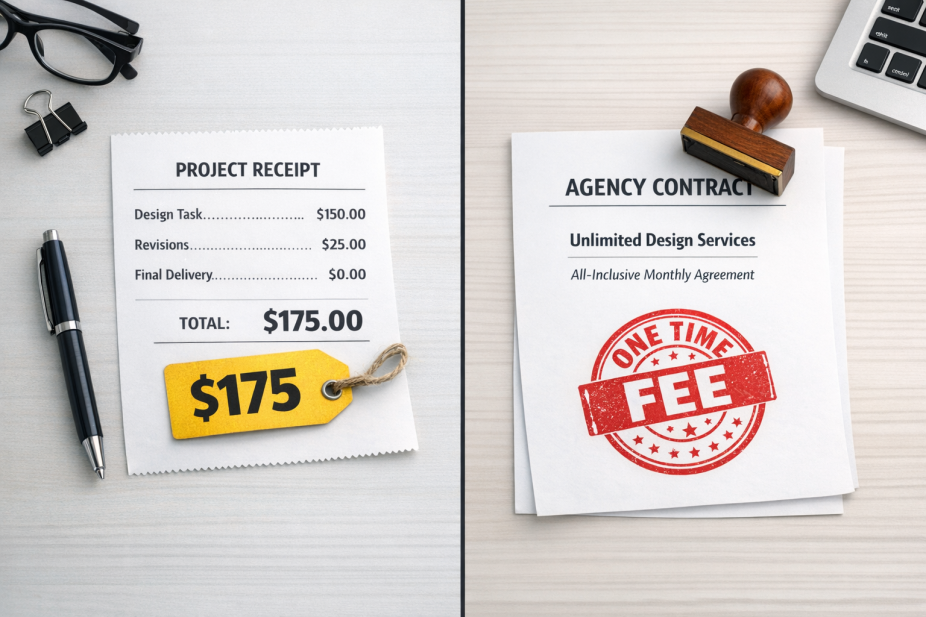
Divi also has a known problem with First Contentful Paint on more complex pages. FCP running 50% longer than the recommended threshold means visitors on slower connections may stare at a blank or partial screen for a noticeable second. That is not a great first impression on a page built to sell something.
Neither builder wins this category outright. Divi is lighter and faster on a raw load time basis. But Elementor holds up better under mobile scoring and on pages with more going on. The right answer depends quite a bit on how complex your landing page design actually is.
Both builders share the need for hosting and optimization work. A caching plugin and compressed images will do more for your scores than switching builders alone. That said, a lighter baseline always makes that optimization easier to achieve.
Pricing Models and What You Actually Get
Elementor has a free version. But the free tier is pretty limited for landing page work - you get basic widgets and no access to the template library, pop-ups, or form integrations that make landing pages work.
Elementor Pro starts at around $59 per year for one site. That gets you the full widget set, landing page templates and marketing tool connections. The annual renewal is worth factoring in from the start, and that's also the case if you are building for a client who will manage the site themselves long-term.
Divi works differently. Elegant Themes charges around $89 per year for access to everything. But the lifetime license at around $249 draws agencies in.
| Feature | Elementor Free | Elementor Pro | Divi (Annual) | Divi (Lifetime) |
|---|---|---|---|---|
| Landing page templates | No | Yes | Yes | Yes |
| Unlimited sites | Yes | No (tiered) | Yes | Yes |
| One-time payment option | No | No | No | Yes |
| Priority support | No | Yes | Yes | Yes |
For a single client project, Elementor Pro at $59 is a low barrier to entry. The per-site pricing model makes sense if you are working on one page for one client and don't plan to scale.
For an agency making landing pages on a regular basis, Divi's lifetime deal removes the recurring cost entirely. If you want to explore free alternatives before committing, that's worth doing before locking into any annual plan.
One thing to watch with Elementor is that higher site counts push you to more expensive tiers faster. If you need Pro features on three or more sites, the annual cost climbs to a level that starts to rival or exceed what Divi charges for unlimited access.
Neither pricing model is universally better - it depends almost entirely on how many sites you build and how long each one should be active with full feature support. Adding a lead generation form to your landing page is another factor that can influence which tool is the right fit.
Third-Party Tool and Integration Support
Once your page looks the way you want, the next question is whether it will connect to the rest of your stack.
Elementor has a long list of native integrations built directly into the form and popup elements. Mailchimp, ActiveCampaign, HubSpot, ConvertKit and a few others connect without needing a plugin or a workaround. For freelancers who manage multiple client accounts across different places, this saves time. You're not hunting for a third-party bridge every time a client uses a different CRM.
Divi also supports popular email platforms. But the experience feels a little more patchwork. Some connections work natively and others push you toward Zapier or a dedicated plugin; it's not a dealbreaker. But it does add steps to a setup that could have been easy.
For payment and checkout tools, neither builder has a built-in processor. Both use WooCommerce, ThriveCart, or similar plugins to manage transactions. Elementor's WooCommerce integration is more polished though, with dedicated builder elements for product pages and checkout flows. If you want to explore additional payment methods on your checkout, both builders can accommodate them through plugins. Divi works with WooCommerce too. But the design control is more limited without extra add-ons.

Both builders let you add tracking scripts and connect to Google Tag Manager without much friction. The difference shows up when you want form submission tracking or conversion events with page elements. Elementor's form builder makes it easier to set that up cleanly because the form data and trigger points are more accessible. If you're running paid campaigns, advanced conversion tracking techniques can help you get more out of either setup.
Webinar tools like Demio or WebinarJam usually connect through embed codes or third-party form integrations. Both builders manage this fine, so there's no gap there.
| Integration Type | Elementor | Divi |
|---|---|---|
| Email Platforms | Native, wide support | Partial native, some via Zapier |
| CRM Tools | Strong native options | Limited without add-ons |
| Checkout / Payments | WooCommerce-focused, polished | WooCommerce-supported, less control |
| Analytics / Tracking | Easy event setup | Manual script-level setup |
The difference between the two builders isn't giant. But Elementor does make third-party connections feel more like a first-class feature than an afterthought.
So, Which One Should You Actually Use?
The choice can depend on your goals. Choose Divi if you want a flat-rate lifetime license, you're building easy pages quickly, and you're comfortable with a slightly heavier front end. Choose Elementor if mobile performance is an absolute must, you use a wide ecosystem of third-party integrations, or you want access to a wider widget library right out of the box.
If you're still on the fence, the most helpful next step is to try on a test site. Divi has a 30-day money-back guarantee, and Elementor has a free version you can check out without spending a cent. Pick the one that feels natural to build in - because the tool you'll actually use is always the right tool.