




WordPress Multisite is one solution that often comes up in these conversations - and for good reason. It's been baked into WordPress core since version 3.0 launched back in 2010, which makes it a legitimately mature feature. But it also has a reputation for being either oversold as a silver bullet or written off outright by those who ran into its limitations early and never looked back. The reality sits somewhere in the middle, and that nuance is worth understanding before restructuring your entire operation around it.
I'll walk you through what WordPress Multisite actually looks like in practice for affiliate marketers - how to set it up, how the network structure works, which affiliate configurations matter, how plugins behave differently in a Multisite environment, and just as importantly, the scenarios where Multisite might create more problems than it solves. The goal isn't to convince you in either direction - it's to give you enough information to make a confident call about whether this setup fits the way you actually work.
Key Takeaways
- WordPress Multisite runs multiple sites from one shared core, plugin files, and hosting environment, but restructuring later is difficult.
- Subdirectory URLs share root domain authority, while subdomains are treated as separate sites by search engines - choose based on SEO strategy.
- Plugin compatibility is a real concern; Multisite-compatible plugins average 2.3 years behind single-site counterparts in updates.
- A security vulnerability anywhere in the network can affect all sites, since they share the same WordPress core files.
- Separate installs managed through a dashboard tool offer full plugin flexibility and SEO control without Multisite's interconnected risks.
What WordPress Multisite Actually Does Under the Hood
When you turn on Multisite, WordPress doesn't just flip a setting - it restructures how your entire installation works. All the sites in your network run from one shared WordPress core, one shared set of plugin files, and one shared theme directory, and each site gets its own content, its own settings, and its own users. But everything sits inside a single hosting environment.
On the database side, Multisite can add 7 extra tables on top of the standard 11 that a standard WordPress install creates. These extra tables manage things like tracking which sites are out there in the network, taking care of site metadata, and storing user relationships across multiple sites. As you add more sites, WordPress also generates extra prefixed tables for each one - so a 10-site network will have considerably more tables than you'd expect walking in.
The structural choice that matters most is how your sites are organized. You can set up your network to use subdomains like pets.yourdomain.com or subdirectories like yourdomain.com/pets. Subdirectory networks are easier to get running on most hosts because they don't need wildcard DNS records. Subdomain networks look cleaner and are easier to scale if each site is meant to feel like a standalone brand.

| Structure Type | Example URL | DNS Setup Needed |
|---|---|---|
| Subdirectory | yourdomain.com/pets | No extra DNS records |
| Subdomain | pets.yourdomain.com | Wildcard DNS record needed |
| Mapped Domain | petsaffiliate.com | Plugin plus DNS pointing required |
You can also map separate domains to individual sites in the network via a plugin - it means a site technically living inside your Multisite install can still appear as its own standalone domain to visitors and search engines.
The architecture is worth understanding upfront, because undoing it later is not easy.
Setting Up a Multisite Network for Your Affiliate Portfolio
Before anything else, check that your hosting environment is able to manage Multisite. Shared hosting plans sometimes block the server-level access you need, so a VPS or managed WordPress host is a more reliable starting point.
To enable Multisite, open your wp-config.php file and add define('WP_ALLOW_MULTISITE', true); above the line that reads "That's all, stop editing!" After saving that, go to your WordPress dashboard and you'll find a new Network Setup screen under the Tools menu. From there, WordPress walks you through the rest and generates the exact code snippets you'll have to paste into wp-config.php and your .htaccess file.
The most important choice you'll make at this stage is picking between subdomains and subdirectories. Subdirectories look like yoursite.com/fitness/ while subdomains look like fitness.yoursite.com. For affiliate marketers, this choice has SEO implications.
| URL Structure | Example | SEO Consideration |
|---|---|---|
| Subdirectory | yoursite.com/fitness/ | Sub-sites share the root domain's authority |
| Subdomain | fitness.yoursite.com | Treated more like separate sites by search engines |
If your goal is to build up one strong root domain across a few related niches, subdirectories are in your favor. If you want each affiliate site to stand on its own, subdomains give you that separation.
One mistake worth flagging here: picking a URL structure based on what looks tidier instead of what fits your SEO strategy. That is a hard thing to undo later, so take a bit of time to think it through.
Remember that subdomain setups also need a wildcard DNS record configured at your domain registrar or host. Your hosting provider's documentation should cover the exact steps for that.
Once your network is live and accessible, the next step is to configure it for affiliate site management.
Configuring Your Network for Affiliate Site Management
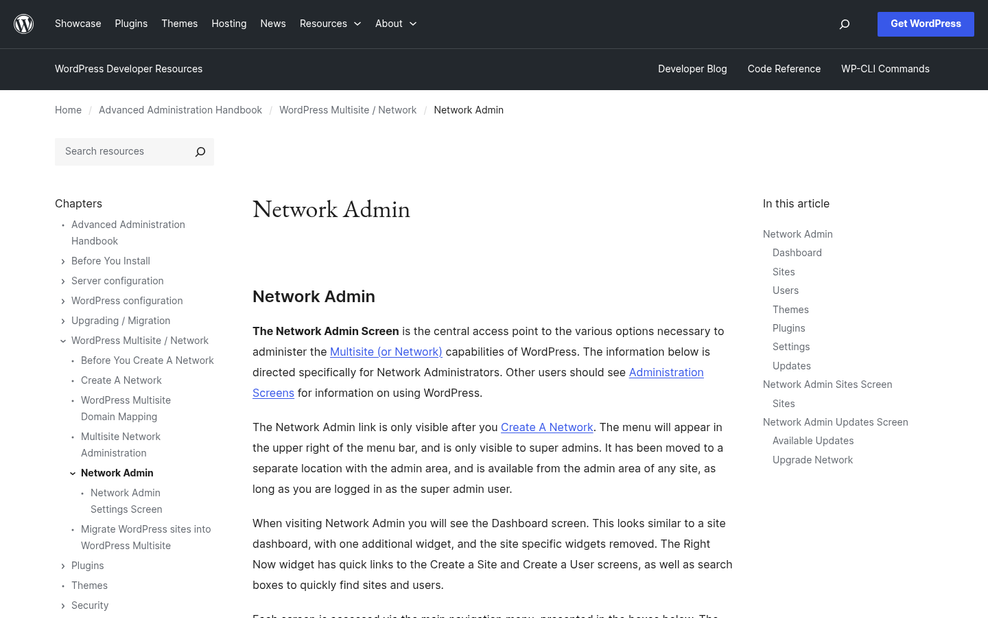
The Network Admin dashboard is your control center for everything that spans across your sites. From here, you can install and activate plugins network-wide, manage themes, and control who has access to what. It sits above the individual site dashboards, so changes you make here can affect every site in your portfolio at once.
User roles work on two levels in Multisite. A Super Admin has full control across the entire network, but a standard admin can only manage their assigned site. If you run all your affiliate sites yourself, then you'll probably stay in the Super Admin seat. But the separation is helpful if you ever bring in writers or managers for specific sites.
Themes and plugins are where things get a bit more complex. You activate a theme or plugin at the network level first, and then each site can use it or not. This gives you flexibility, but it also means you'll have to remember which tools should be widespread and which ones should stay contained to a single site.
Affiliate tools like link cloaking plugins or tracking software are worth thinking through. Some work fine on a per-site basis, and others expect to run as the only instance on a domain and can behave strangely in a shared environment. Test these before going live. It's also worth considering how Google treats affiliate links across multiple sites on the same network.
Plugin compatibility is a genuine concern for Multisite networks. Plugins built specifically for Multisite environments have a fairly small install base on average and haven't seen updates in years, which isn't necessarily a dealbreaker. But it does mean you'll want to check update history and compatibility notes before using anything too heavily. For SEO plugins in particular, reviewing the best WordPress SEO plugin options can help you choose one that plays nicely across sites.
| Tool Type | Best Activated | Watch Out For |
|---|---|---|
| SEO plugins | Network-wide | Settings bleeding between sites |
| Link cloaking tools | Per site | Conflicts with shared databases |
| Analytics plugins | Network-wide | Tracking IDs need per-site config |
| Affiliate tracking software | Per site | Single-domain assumptions in code |
The Honest Downsides of Running Affiliate Sites on Multisite
Multisite works pretty well in the right hands. But it does have friction that affiliate marketers hit more than most - it's worth learning about what you're getting into before you commit.
The plugin situation is one of the more frustrating parts. Not every plugin you'll want for affiliate work is built with Multisite in mind, and many that technically work haven't been updated for it. The average update lag for Multisite-compatible plugins runs around 2.3 years behind their single-site counterparts. When you're relying on affiliate link management tools, comparison tables, or redirect plugins, that gap can put you in a tough position.
Security is another area where Multisite's structure works against you. All sites in a network share the same WordPress core files. That means one vulnerability anywhere in the network has a path to everything else. On separate installs, a compromised site stays contained.
For affiliate marketers specifically, SEO can add a layer of concern. Keeping each niche site independent in Google's eyes is harder when they share an installation. Internal linking patterns, shared IP addresses, and network-level footprints can blur the lines between sites you'd rather separate. That matters quite a bit when each domain is targeting a different audience and keyword set. It's also worth understanding why affiliate links can create additional SEO challenges on top of the structural concerns Multisite introduces.
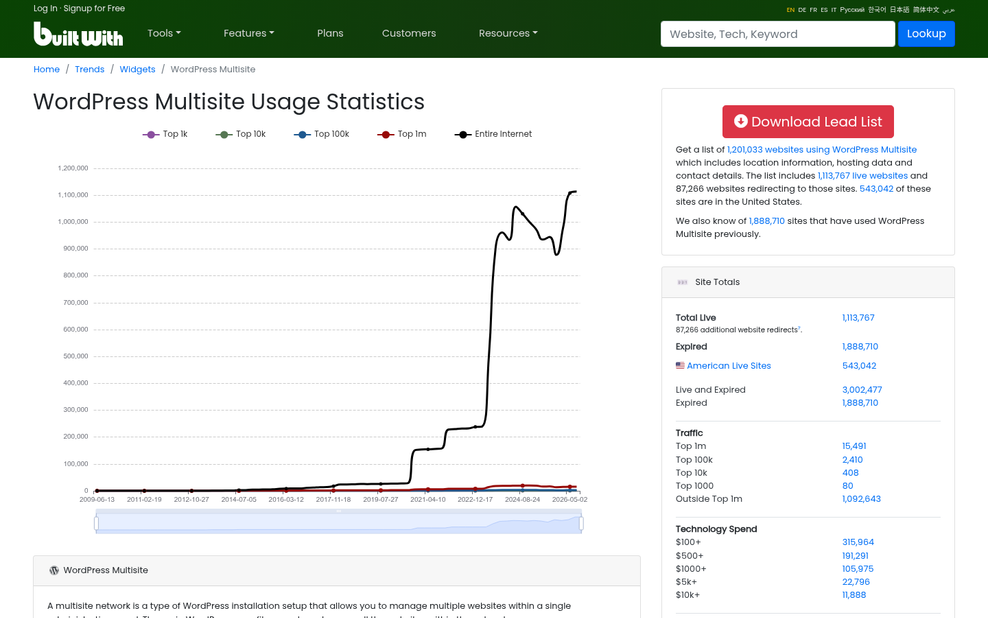
It's also worth noting that less than 1% of WordPress sites run on Multisite - a signal that the ecosystem has not kept pace with where WordPress development attention goes. Fewer users means fewer developers building for it and fewer community resources when something breaks.
The question is whether your portfolio of sites gets easier to run with Multisite or just gets more interconnected in ways that introduce new problems. For some affiliate site setups, the answer will be the latter.
Alternatives to Multisite Worth Considering for Affiliate Networks
Multisite is not the only way to manage a network of affiliate sites from one place. If the limitations covered in the previous section felt like dealbreakers, there are helpful paths that get you similar convenience without the trade-offs.
One of the most popular alternatives is to run separate WordPress installs and connect them through a management dashboard tool - this keeps every site independent, so you get plugin flexibility and total SEO control per site. You can update, monitor, and manage them all from a single interface without the sites being tied together at the core level. It takes a bit more first-time setup, but day-to-day management is fairly streamlined.
Managed WordPress hosting providers sometimes include their own multi-site dashboards that let you manage updates and performance across all your installs in one location. These are worth a deeper look if you want simplicity without sacrificing SEO or plugin freedom. You do give up some technical control compared to self-hosting everything, but for affiliate site owners that trade is worth it.
For very lightweight affiliate microsites, flat-file or headless setups are also on the table. These strip away WordPress overhead and can perform well, though they have a steeper technical curve and less ready-made affiliate tools.

The table below shows how these strategies compare on the things that matter most for affiliate work.
| Approach | Setup Complexity | Plugin Flexibility | SEO Control |
|---|---|---|---|
| WordPress Multisite | Medium-High | Limited | Moderate |
| Separate Installs + Dashboard Tool | Low-Medium | Full | Full |
| Managed Hosting Multi-Dashboard | Low | Moderate | Full |
The right choice depends on how much you value simplicity versus how much control each individual site needs. A tightly themed affiliate network might thrive on Multisite, but a group of unrelated niche sites will usually do better as separate installs.
Is WordPress Multisite the Right Move for Your Affiliate Setup?
Before committing, audit your portfolio against three things:
- Portfolio size and similarity - Multisite rewards you most when sites are numerous and structurally alike. A handful of niche sites with different audiences and monetization setups may perform better as separate installs.
- Technical comfort level - Network administration adds a layer of complexity around user roles, plugin activation, and domain mapping. If you're not comfortable troubleshooting at the network level, that overhead can cancel out the management gains.
- Growth plans - If you intend to sell individual sites, bring on co-owners, or move to managed hosting per property, separate installs give you more flexibility down the road.
If Multisite still looks like the right fit, stay away from migrating your live sites first. Spin up a staging environment, replicate your common site setup across two or three sub-sites, and stress-test the plugins and SEO configuration you use most. If you hit friction there, then you'll hit it in production. There's no penalty for starting with separate installs and consolidating into a network later once your portfolio justifies it - the migration path exists, and it's far easier than trying to untangle a Multisite setup that wasn't the right tool for the job.